Adobe Flash End-of-Life and How To Uninstall

Adobe Flash Player went out of support as of December 31, 2020. For more information, see the Adobe Flash Player EOL General Information Page.

Microsoft has released update KB4577586, which is named “Update for the removal of Adobe Flash Player: October 27, 2020“. This update removes Adobe Flash from all Windows 10 and Windows Server systems. Please note: Once this update has been installed, it cannot be removed. Also, this update will only uninstall the ActiveX version of Adobe Flash, and not those installed via other mechanisms.

This update is currently not available in Windows Server Update Service (WSUS), and therefore is only available via the Microsoft Update Catalog. Microsoft states that it will be made available in early 2021.

Manual Installation:
You can install this update manually on systems running Windows 10 or server OS such as Windows Server 2012, 2012 R2, 2016, and 2019 by downloading the update using the Microsoft Update Catalog portal, and selecting the appropriate OS for your system.
Deployment Using WSUS/ConfigMgr:
To deploy this update to multiple systems, you will need to use WSUS to import the update.
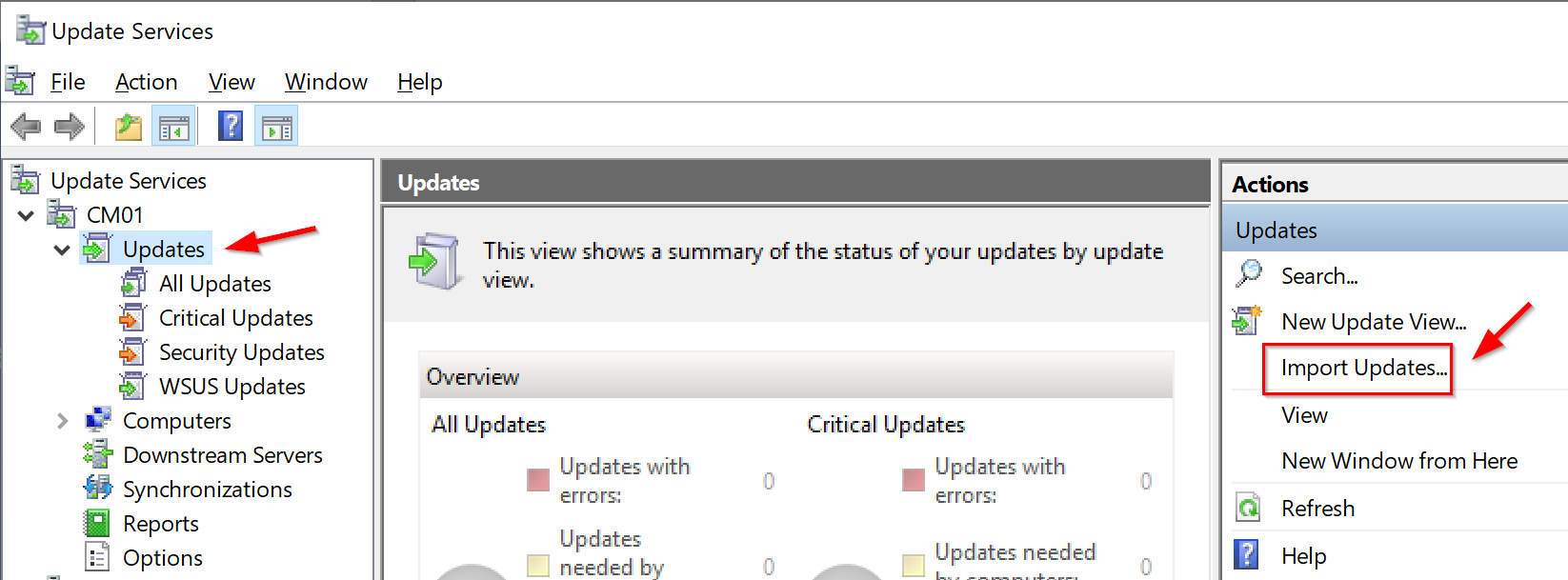
1. Launch the WSUS console, expand your server name, then click on Updates in the left-hand pane.
2. In the right-hand Actions pane, click on Import Updates. This will launch the Microsoft Update Catalog in your default browser.
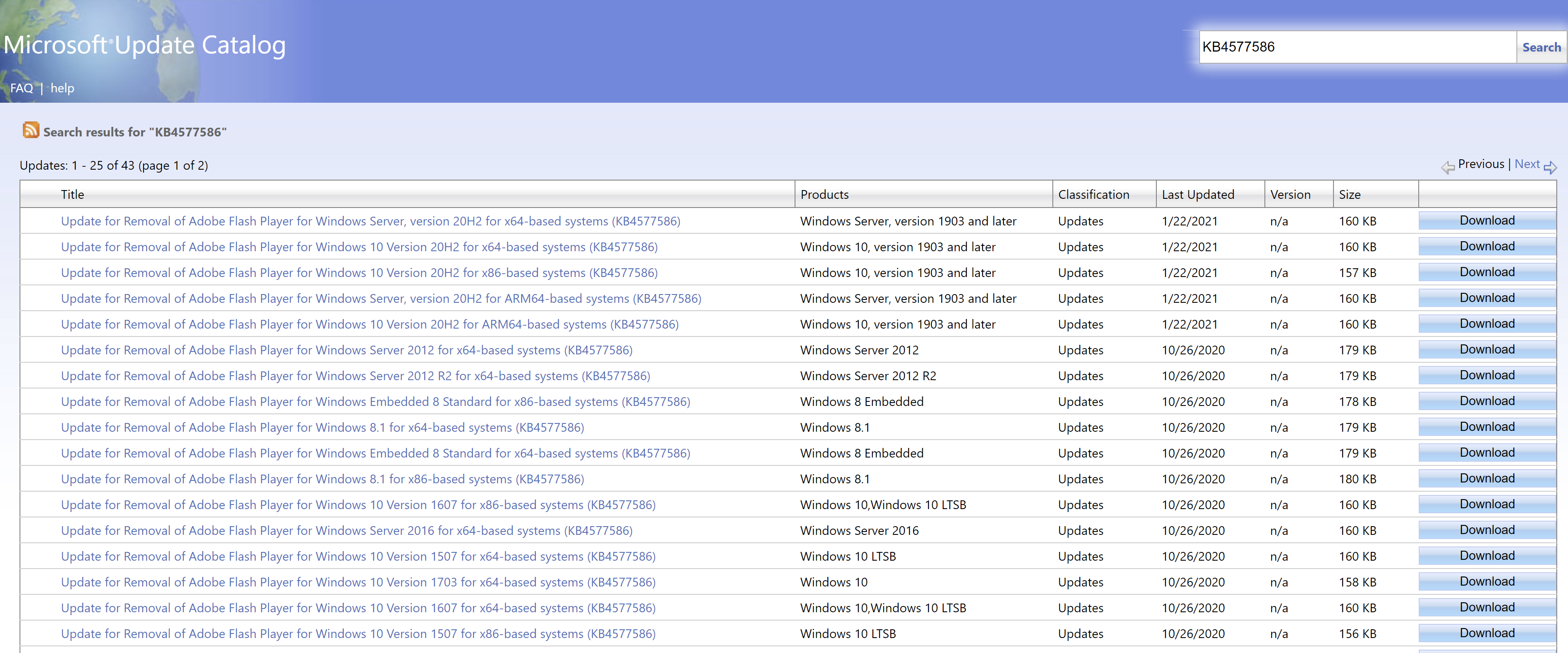
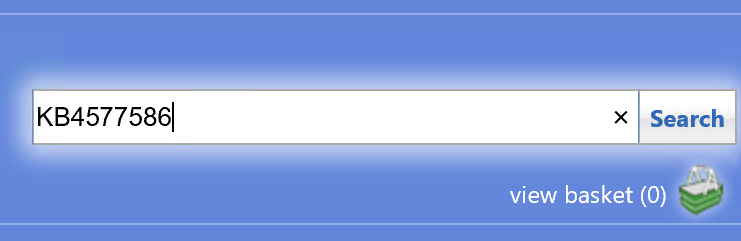
3. In the Microsoft Update Catalog portal, click in the Search box on the top right hand side, and type KB4577586, and click Search.
4. Select the update for the desired OS types, and click on the Add button. This will add the updates to the basket.
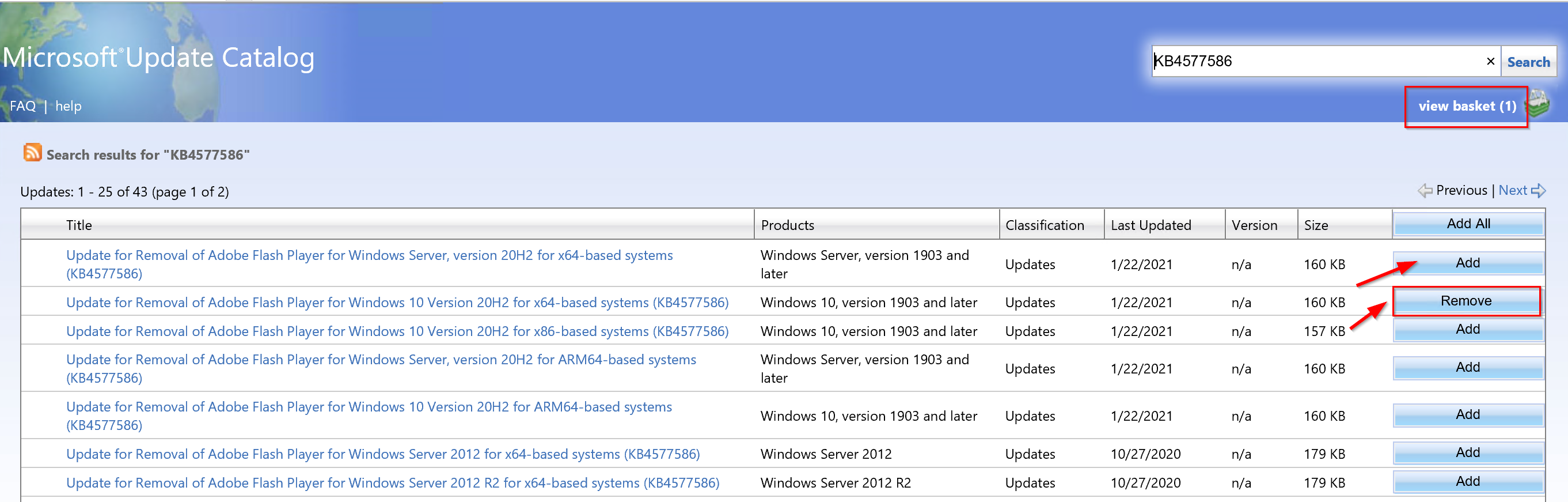
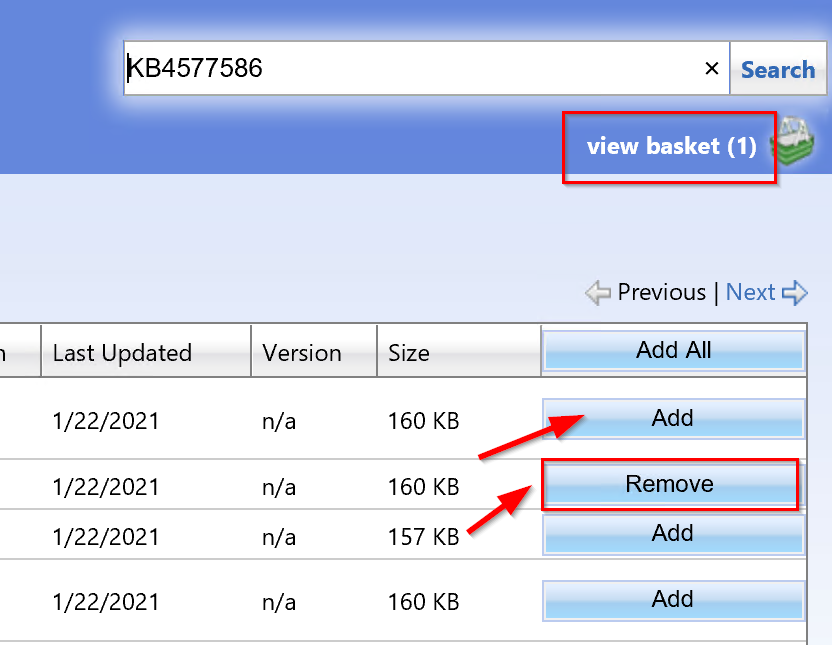
5. Click on view basket on the top right-hand side of the page, which is located right below the search box. You will find all the updates you have added to be imported. Make sure that the checkbox for “Import directly into Windows Server Update Services” is selected, and then click the Import button. A window will open to show the import progress and when completed, the updates will be in WSUS.

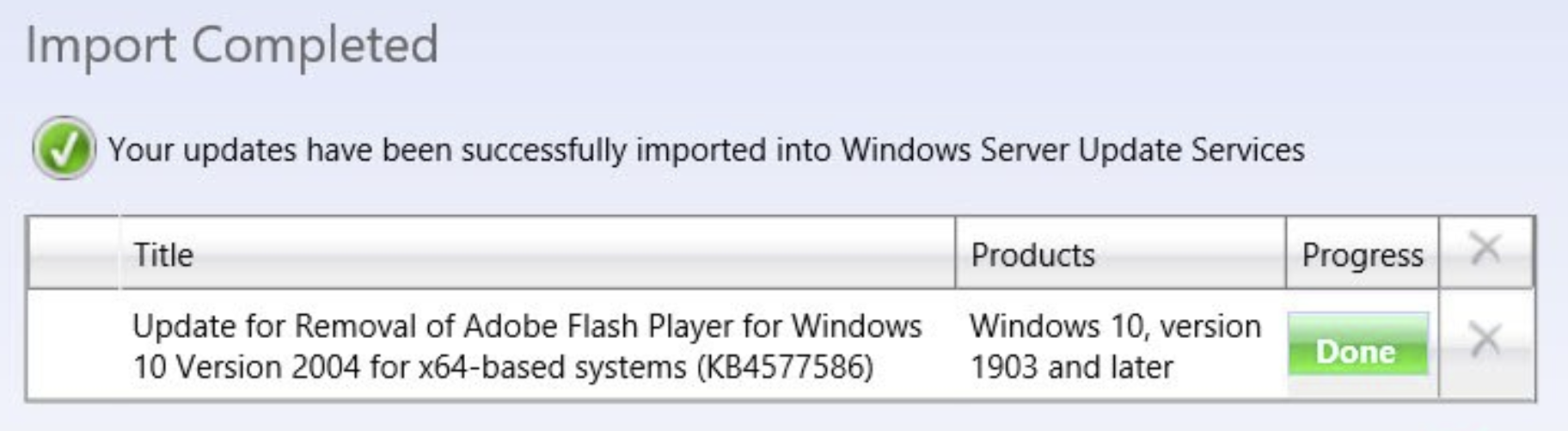
In case you run into the following failed import state, you will need to add a fix in the registry.
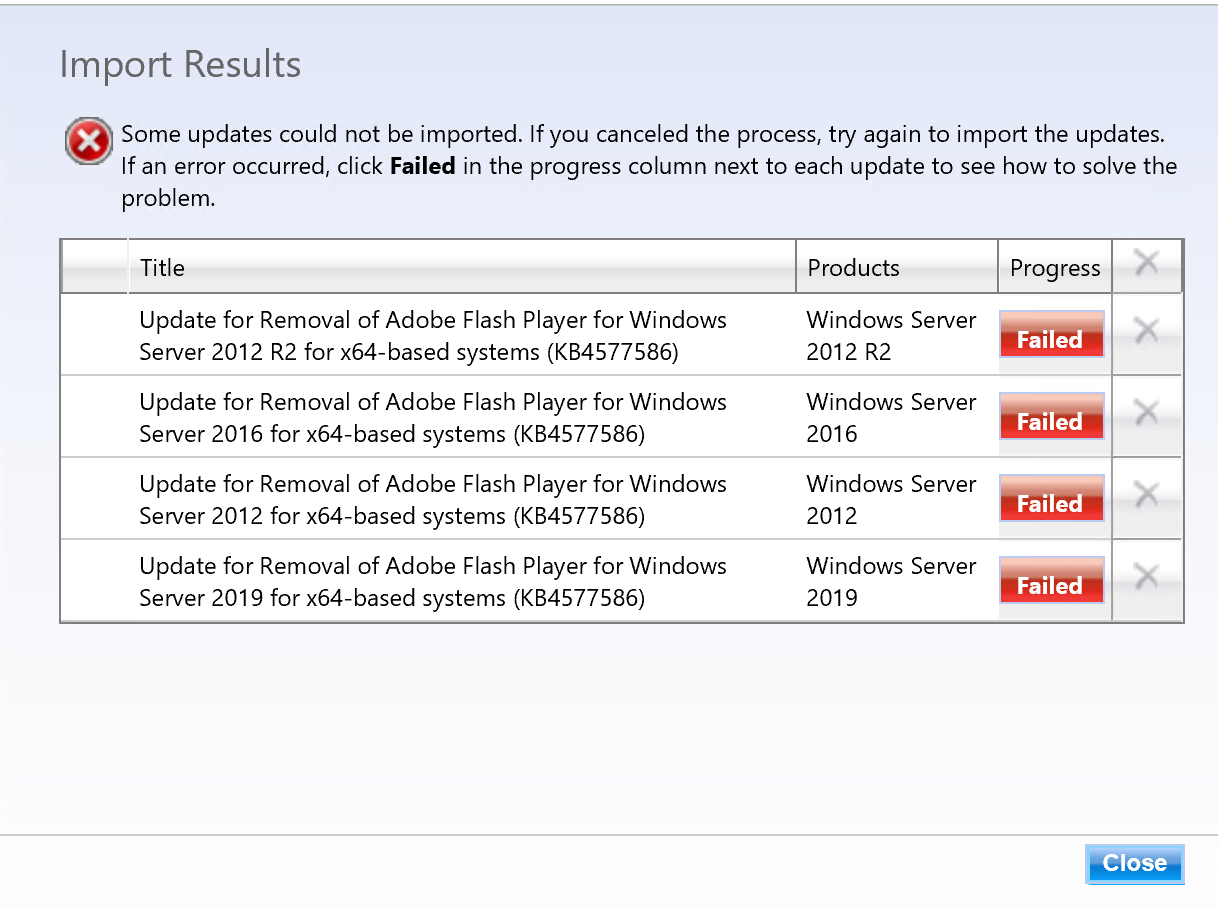
By clicking on the red button labeled “Failed“, you will see it mentions the error number 80131509 with a description as seen in the image below.
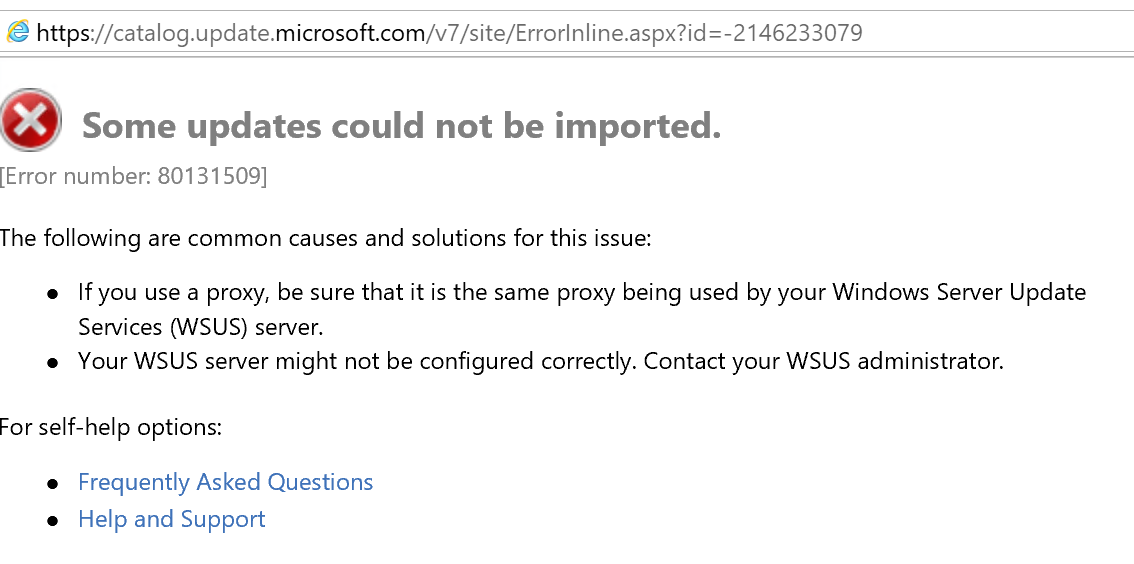
To fix the error, launch the registry console by running regedit on the server.
Navigate to: HKEY_LOCAL_MACHINE\SOFTWARE\Microsoft\.NETFramework\v4.0.30319.

Create a new DWORD (32-bit) key, and specify the name as SchUseStrongCrypto and apply the value as 1. Then, restart the server.

Update With ConfigMgr:
If you use ConfigMgr to manage and deploy your Windows Updates, you will need to run a Software Update sync from the ConfigMgr console to pull in the recently imported updates from WSUS.

In the ConfigMgr console, under the Software Library node, go to Software Updates > All Software Updates. To synchronize updates, you can either click the Synchronize Software Updates button on the top left-hand of the console or right-click on “All Software Updates, and select “Synchronize Software Updates” from the pop-out menu.
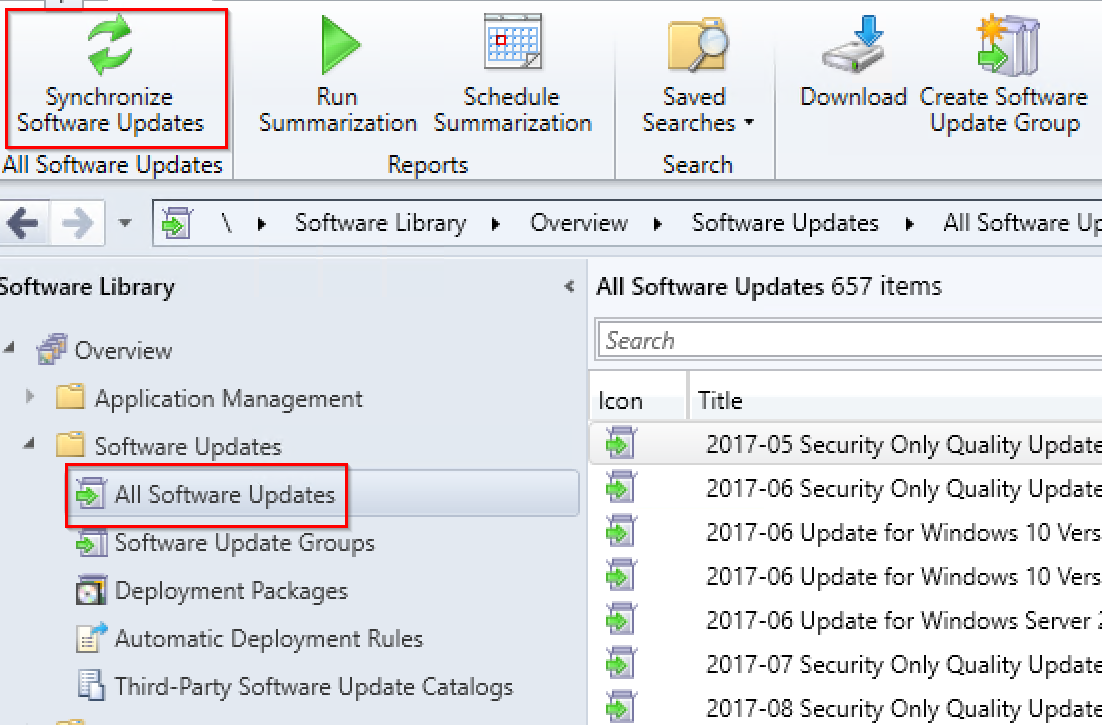
On successful completion of the software update sync, you will find the update for KB4577586 under “All Software Updates”. At this point, you will need to download the updates into a deployment package, and then deploy the updates to the device collections.

I will add the steps and screen captures to show how to download and deploy the updates using ConfigMgr in my next update or revision of this blog post. Stay tuned.

The resources below are other options available to uninstall using PowerShell scripts. These were written by my friend Ben Whitmore aka ByteBen. He uses the application method instead of the software updates method to uninstall Adobe Flash from systems using the scripts he wrote. Check it out:

1. How to Uninstall Adobe Flash Player from Windows 10 with ConfigMgr
2. Deploy the Update for Removal of Adobe Flash Player (KB4577586) using Intune

Here’s a YouTube episode on Namaste Techies covering all about Adobe Flash removal, including demos and useful tips. Please like and subscribe to the channel. Thanks.


January 2021 – Microsoft Patch Tuesday and Other Patches

Microsoft has released fixes for 83 vulnerabilities, with ten updates classified as Critical and 73 as Important.

Windows 10 Updates for January 2021:

  • KB4598242 (OS Builds 19041.746 and 19042.746) for Windows 10 version 20H2/2004
  • KB4598229 (OS Build 18363.1316) for Windows 10, version 1909
  • KB4598230 (OS Build 17763.1697) for Windows 10 version 1809
  • KB4598245 (OS Build 17134.1967) for Windows 10 version 1803
  • KB4599208 (OS Build 15063.2614) for Windows 10 version 1703
  • KB4598243 (OS Build 14393.4169) for Windows 10 version 1607
  • KB4598231 (OS Build 10240.18818) for Windows 10, initial release

Additional January 2021 Patching Resources:

On January 12, 2021 (Pacific Time), Microsoft released security updates affecting the following Microsoft products:

Product FamilyMaximum SeverityMaximum ImpactAssociated KB Articles and/or Support Webpages
Windows 10 v20H2, v2004, v1909, v1809, and v1803CriticalRemote Code ExecutionWindows 10 v2004 and Windows 10 v20H2: 4598242 Windows 10 v1909: 4598229 Windows 10 v1809: 4598230 Windows 10 v1803: 4598245
Windows Server 2019, Windows Server 2016, and Server Core installations (2019, 2016, v20H2, v2004, v1909)CriticalRemote Code ExecutionWindows Server 2019: 4598230 Windows Server 2016: 4598243 Windows Server v2004 and Windows Server v20H2: 4598242 Windows Server v1909: 4598229
Windows 8.1, Windows Server 2012 R2, and Windows Server 2012CriticalRemote Code ExecutionWindows 8.1 and Windows Server 2012 R2 Monthly Rollup: 4598285 Windows 8.1 and Windows Server 2012 R2 Security Only: 4598275 Windows Server 2012 Monthly Rollup: 4598278 Windows Server 2012 Security Only: 4598297
Microsoft Office-related softwareImportantRemote Code ExecutionKB Articles associated with Microsoft Office-related software: 4493156, 4486736, 4486755, 4486759, 4486762, 4486764, 4493142, 4493143, 4493145, 4493160, 4493165, 4493168, 4493171, 4493176, 4493181, 4493183, and 4493186
Microsoft SharePoint-related softwareImportantRemote Code ExecutionKB Articles associated with Microsoft SharePoint-related software: 4486683, 4486724, 4493161, 4493162, 4493163, 4493167, 4493175, 4493178, and 4493187
Microsoft .NET-related softwareImportantDenial of ServiceFind details on security updates for .NET Framework-related software in the Security Update Guide: https://msrc.microsoft.com/update-guide
Microsoft SQL Server-related softwareImportantElevation of PrivilegeKB Articles associated with Microsoft SQL Server-related software: 4583456, 4583457, 4583458, 4583459, 4583460, 4583461, 4583462, 4583463, and 4583465
Microsoft Visual Studio-related softwareImportantRemote Code ExecutionKB Articles associated with Microsoft Visual Studio-related software: 4584787
Microsoft Malware Protection EngineCriticalRemote Code ExecutionFind details for security updates for the Microsoft Malware Protection Engine in the Security Update Guide: https://msrc.microsoft.com/update-guide

Notes:

  • The summary above is an overview of updates for the most recent versions of commonly used software.
  • Updates for older versions, apps, and open source software may not be listed.
  • Updates may have been added or removed from the release after this content was finalized.
  • Find details for all updates in the monthly release in the Security Update Guide: https://msrc.microsoft.com/update-guide
  • For additional details, see the release notes at: https://msrc.microsoft.com/update-guide/releaseNote/2021-Jan  

Security vulnerability overview:

Below is a summary showing the number of vulnerabilities addressed in this release, broken down by product/component and by impact.

Vulnerability DetailsRCEEOPIDSFBDOSSPFTMPPublicly DisclosedKnown ExploitMax CVSS
Windows 10 v20H2 & Windows Server v20H21331106200108.8
Windows 10 v2004 & Windows Server v20041331106200108.8
Windows 10 v1909 & Windows Server v1909133086200108.8
Windows 10 v1809 & Windows Server 2019133086100108.8
Windows 10 v1803133076100108.8
Windows Server 2016132775200108.8
Windows 8.1 & Server 2012 R2131764200108.8
Windows Server 2012131752100108.8
Microsoft Office-related software5000000007.8
Microsoft SharePoint-related software4200021008.8
Microsoft SQL Server-related software0100000008.8
Microsoft Visual Studio-related software1200100007.8
Microsoft .NET-related software0000100007.5
Microsoft Malware Protection Engine1000000017.8
RCE = Remote Code Execution | EOP = Elevation of Privilege | ID = Information Disclosure | SFB = Security Feature Bypass | DOS = Denial of Service | SPF = Spoofing | TMP = Tampering

Notes: 

  • Vulnerabilities that overlap components may be represented more than once in the table.
  • The summary above is an overview of updates for commonly used software. Updates for older versions, apps, and open source software may not be listed.
  • Updates may have been added or removed from the release after this content was finalized.
  • Find details for all updates in the monthly release in the Security Update Guide: https://msrc.microsoft.com/update-guide
  • For additional details, see the release notes at: https://msrc.microsoft.com/update-guide/releaseNote/2021-Jan  

Resources for deploying updates to remote devices:

With so many people working remotely, it is a good time to review guidance on deploying security updates to remote devices, such as desktops, laptops, and tablets. Here are some resources to answer questions pertaining to deploying updates to remote devices.

Part 1: Helping businesses rapidly set up to work securely from personal PCs and mobiles
Part 2: Helping IT send and provision business PCs at home to work securely during COVID-19
Part 3: Manage work devices at home during Covid-19 using Configuration Manager
Part 4: Managing remote machines with cloud management gateway (CMG)
Part 5: Managing Patch Tuesday with Configuration Manager in a remote work world

See also:
Mastering​ Configuration Manager Bandwidth limitations for VPN connected Clients

Vulnerability details for the current month:

Below are summaries for some of the security vulnerabilities in this release. These specific vulnerabilities were selected from the larger set of vulnerabilities in the release for one or more of the following reasons: 1) We received inquiries regarding the vulnerability; 2) the vulnerability may have received attention in the trade press; or 3) the vulnerability is potentially more impactful than others in the release. Because we do not provide summaries for every vulnerability in the release, you should review the content in the Security Update Guide for information not provided in these summaries.

Notes on details in the vulnerability summaries:

Attack VectorThis metric reflects the context by which vulnerability exploitation is possible. The Base Score increases the more remote (logically, and physically) an attacker can be in order to exploit the vulnerable component.
Attack ComplexityThis metric describes the conditions beyond the attacker’s control that must exist in order to exploit the vulnerability. Such conditions may require the collection of more information about the target or computational exceptions. The assessment of this metric excludes any requirements for user interaction in order to exploit the vulnerability. If a specific configuration is required for an attack to succeed, the Base metrics should be scored assuming the vulnerable component is in that configuration.
Privileges RequiredThis metric describes the level of privileges an attacker must possess before successfully exploiting the vulnerability.
User InteractionThis metric captures the requirement for a user, other than the attacker, to participate in the successful compromise the vulnerable component. This metric determines whether the vulnerability can be exploited solely at the will of the attacker, or whether a separate user (or user-initiated process) must participate in some manner.
CVE-2021-1674Windows Remote Desktop Protocol Core Security Feature Bypass Vulnerability
ImpactSecurity Feature Bypass
SeverityImportant
Publicly Disclosed?No
Known Exploits?No
ExploitabilityExploitation less likely
CVSS Base Score8.8
Attack VectorNetwork
Attack ComplexityLow
Privileges RequiredLow
User InteractionNone
ScopeUnchanged
ConfidentialityHigh
IntegrityHigh
AvailabilityHigh
Affected SoftwareAll supported versions of Windows
More Informationhttps://msrc.microsoft.com/update-guide/vulnerability/CVE-2021-1674
CVE-2021-1673Remote Procedure Call Runtime Remote Code Execution Vulnerability
ImpactRemote Code Execution
SeverityCritical
Publicly Disclosed?No
Known Exploits?No
ExploitabilityExploitation less likely
CVSS Base Score8.8
Attack VectorNetwork
Attack ComplexityLow
Privileges RequiredLow
User InteractionNone
ScopeUnchanged
ConfidentialityHigh
IntegrityHigh
AvailabilityHigh
Affected SoftwareAll supported versions of Windows
More Informationhttps://msrc.microsoft.com/update-guide/vulnerability/CVE-2021-1673
CVE-2021-1643HEVC Video Extensions Remote Code Execution Vulnerability
ImpactRemote Code Execution
SeverityCritical
Publicly Disclosed?No
Known Exploits?No
ExploitabilityExploitation less likely
CVSS Base Score7.8
Attack VectorLocal
Attack ComplexityLow
Privileges RequiredNone
User InteractionRequired
ScopeUnchanged
ConfidentialityHigh
IntegrityHigh
AvailabilityHigh
Affected SoftwareHEVC Video Extensions
More Informationhttps://msrc.microsoft.com/update-guide/vulnerability/CVE-2021-1643
CVE-2021-1648Microsoft splwow64 Elevation of Privilege Vulnerability
ImpactElevation of Privilege
SeverityImportant
Publicly Disclosed?Yes
Known Exploits?No
ExploitabilityExploitation less likely
CVSS Base Score7.8
Attack VectorLocal
Attack ComplexityLow
Privileges RequiredLow
User InteractionNone
ScopeUnchanged
ConfidentialityHigh
IntegrityHigh
AvailabilityHigh
Affected SoftwareAll supported versions of Windows
More Informationhttps://msrc.microsoft.com/update-guide/vulnerability/CVE-2021-1648
CVE-2021-1665GDI+ Remote Code Execution Vulnerability
ImpactRemote Code Execution
SeverityCritical
Publicly Disclosed?No
Known Exploits?No
ExploitabilityExploitation less likely
CVSS Base Score7.8
Attack VectorLocal
Attack ComplexityLow
Privileges RequiredLow
User InteractionNone
ScopeUnchanged
ConfidentialityHigh
IntegrityHigh
AvailabilityHigh
Affected SoftwareAll supported versions of Windows
More Informationhttps://msrc.microsoft.com/update-guide/vulnerability/CVE-2021-1665
CVE-2021-1705Microsoft Edge (HTML-based) Memory Corruption Vulnerability
ImpactRemote Code Execution
SeverityCritical
Publicly Disclosed?No
Known Exploits?No
ExploitabilityExploitation less likely
CVSS Base Score4.2
Attack VectorNetwork
Attack ComplexityHigh
Privileges RequiredNone
User InteractionRequired
ScopeUnchanged
ConfidentialityLow
IntegrityLow
AvailabilityNone
Affected SoftwareMicrosoft Edge (EdgeHTML-based)
More Informationhttps://msrc.microsoft.com/update-guide/vulnerability/CVE-2021-1705
CVE-2021-1707Microsoft SharePoint Server Remote Code Execution Vulnerability
ImpactRemote Code Execution
SeverityImportant
Publicly Disclosed?No
Known Exploits?No
ExploitabilityExploitation more likely
CVSS Base Score8.8
Attack VectorNetwork
Attack ComplexityLow
Privileges RequiredLow
User InteractionNone
ScopeUnchanged
ConfidentialityHigh
IntegrityHigh
AvailabilityHigh
Affected SoftwareMicrosoft SharePoint Foundation 2013, SharePoint Foundation 2010, SharePoint Server 2019, and SharePoint Enterprise Server 2016
More Informationhttps://msrc.microsoft.com/update-guide/vulnerability/CVE-2021-1707
CVE-2021-1714Microsoft Excel Remote Code Execution Vulnerability
ImpactRemote Code Execution
SeverityImportant
Publicly Disclosed?No
Known Exploits?No
ExploitabilityExploitation less likely
CVSS Base Score7.8
Attack VectorLocal
Attack ComplexityLow
Privileges RequiredNone
User InteractionRequired
ScopeUnchanged
ConfidentialityHigh
IntegrityHigh
AvailabilityHigh
Affected SoftwareMicrosoft Excel 365 Apps for Enterprise, Excel Services, Excel 2010, Excel 2013, Excel 2016, Office 2010, Office 2013, Office 2016, Office 2019, Office 2019 for Mac, Office Online Server, Office Web Apps Server 2013, and Office SharePoint Enterprise Server 2013.
More Informationhttps://msrc.microsoft.com/update-guide/vulnerability/CVE-2021-1714
CVE-2021-1715Microsoft Word Remote Code Execution Vulnerability
ImpactRemote Code Execution
SeverityImportant
Publicly Disclosed?No
Known Exploits?No
ExploitabilityExploitation less likely
CVSS Base Score7.8
Attack VectorLocal
Attack ComplexityLow
Privileges RequiredNone
User InteractionRequired
ScopeUnchanged
ConfidentialityHigh
IntegrityHigh
AvailabilityHigh
Affected SoftwareMicrosoft Excel 365 Apps for Enterprise, Word 2010, Word 2013, Word 2016, Office 2010, Office 2019, Office 2019 for Mac, Office Online Server, Office Web Apps 2010, Office Web Apps Server 2013, Office SharePoint Enterprise Server 2013, SharePoint Enterprise Server 2016, SharePoint Server 2010, and SharePoint Server 2019 
More Informationhttps://msrc.microsoft.com/update-guide/vulnerability/CVE-2021-1715
CVE-2021-1636Microsoft SQL Elevation of Privilege Vulnerability
ImpactElevation of Privilege
SeverityImportant
Publicly Disclosed?No
Known Exploits?No
ExploitabilityExploitation less likely
CVSS Base Score8.8
Attack VectorNetwork
Attack ComplexityLow
Privileges RequiredLow
User InteractionNone
ScopeUnchanged
ConfidentialityHigh
IntegrityHigh
AvailabilityHigh
Affected SoftwareMicrosoft SQL Server 2012, SQL Server 2014, SQL Server 2016, SQL Server 2017, and SQL Server 2019
More Informationhttps://msrc.microsoft.com/update-guide/vulnerability/CVE-2021-1636
CVE-2021-1647Microsoft Defender Remote Code Execution Vulnerability
ImpactRemote Code Execution
SeverityCritical
Publicly Disclosed?No
Known Exploits?Yes
ExploitabilityExploitation detected
CVSS Base Score7.8
Attack VectorLocal
Attack ComplexityLow
Privileges RequiredLow
User InteractionNone
ScopeUnchanged
ConfidentialityHigh
IntegrityHigh
AvailabilityHigh
Affected SoftwareMicrosoft Security Essentials, System Center 2012 R2, System Center Endpoint Protection, Windows Defender
More Informationhttps://msrc.microsoft.com/update-guide/vulnerability/CVE-2021-1647 

Disclosure: Source for the info below:

List of patched Office security vulnerabilities

Office security updates published as part of the January 2021 Patch Tuesday address bugs exposing Windows systems running vulnerable Click to Run and Microsoft Installer (.msi)-based editions of Microsoft Office products to remote code execution (RCE) attacks.

Microsoft rated the six RCE bugs patched this month as Important severity issues since they could enable attackers to execute arbitrary code in the context of the currently logged-in user.

TagCVE IDCVE TitleSeverity
Microsoft OfficeCVE-2021-1713Microsoft Excel Remote Code Execution VulnerabilityImportant
Microsoft OfficeCVE-2021-1714Microsoft Excel Remote Code Execution VulnerabilityImportant
Microsoft OfficeCVE-2021-1711Microsoft Office Remote Code Execution VulnerabilityImportant
Microsoft OfficeCVE-2021-1715Microsoft Word Remote Code Execution VulnerabilityImportant
Microsoft OfficeCVE-2021-1716Microsoft Word Remote Code Execution VulnerabilityImportant
Microsoft Office SharePointCVE-2021-1712Microsoft SharePoint Elevation of Privilege VulnerabilityImportant
Microsoft Office SharePointCVE-2021-1707Microsoft SharePoint Server Remote Code Execution VulnerabilityImportant
Microsoft Office SharePointCVE-2021-1718Microsoft SharePoint Server Tampering VulnerabilityImportant
Microsoft Office SharePointCVE-2021-1717Microsoft SharePoint Spoofing VulnerabilityImportant
Microsoft Office SharePointCVE-2021-1719Microsoft SharePoint Elevation of Privilege VulnerabilityImportant
Microsoft Office SharePointCVE-2021-1641Microsoft SharePoint Spoofing VulnerabilityImportant

January 2021 Microsoft Office security updates

Microsoft Office security updates are delivered through the Microsoft Update platform and via the Download Center.

Further information about each of them is available within the knowledge base articles linked below.

To download the January 2021 Microsoft Office security updates, you have to click on the corresponding knowledge base article below and then scroll down to the ‘How to download and install the update‘ section.

Microsoft Office 2016

ProductKnowledge Base article title and number
Excel 2016Security update for Excel 2016 (KB4493165)
Office 2016Security update for Office 2016 (KB4493168)
Office 2016Security update for Office 2016 (KB4486755)
Word 2016Security update for Word 2016 (KB4493156)


Microsoft Office 2013

ProductKnowledge Base article title and number
Excel 2013Security update for Excel 2013 (KB4493176)
Office 2013Security update for Office 2013 (KB4486762)
Office 2013Security update for Office 2013 (KB4486759)
Word 2013Security update for Word 2013 (KB4486764)


Microsoft Office 2010

ProductKnowledge Base article title and number
Excel 2010Security update for Excel 2010 (KB4493186)
Office 2010Security update for Office 2010 (KB4493143)
Office 2010Security update for Office 2010 (KB4493142)
Office 2010Security update for Office 2010 (KB4493181)
Word 2010Security update for Word 2010 (KB4493145)


Microsoft SharePoint Server 2019

ProductKnowledge Base article title and number
Office Online ServerSecurity update for Office Online Server (KB4493160)
SharePoint Server 2019Security update for SharePoint Server 2019 (KB4493162)
SharePoint Server 2019 Language PackSecurity update for SharePoint Server 2019 Language Pack (KB4493161)


Microsoft SharePoint Server 2016

ProductKnowledge Base article title and number
SharePoint Enterprise Server 2016Security update for SharePoint Enterprise Server 2016 (KB4493163)
SharePoint Enterprise Server 2016Security update for SharePoint Enterprise Server 2016 (KB4493167)


Microsoft SharePoint Server 2013

ProductKnowledge Base article title and number
Office Web Apps Server 2013Security update for Office Web Apps Server 2013 (KB4493171)
Project Server 2013Cumulative update for Project Server 2013 (KB4493173)
SharePoint Enterprise Server 2013Security update for SharePoint Enterprise Server 2013 (KB4486724)
SharePoint Enterprise Server 2013Security update for SharePoint Enterprise Server 2013 (KB4486683)
SharePoint Enterprise Server 2013Cumulative update for SharePoint Enterprise Server 2013 (KB4493150)
SharePoint Foundation 2013Security update for SharePoint Foundation 2013 (KB4493175)
SharePoint Foundation 2013Cumulative update for SharePoint Foundation 2013 (KB4493172)


Microsoft SharePoint Server 2010

ProductKnowledge Base article title and number
Project Server 2010Cumulative update for Project Server 2010 (KB4493182)
SharePoint Foundation 2010Security update for SharePoint Foundation 2010 (KB4493187)
SharePoint Server 2010Security update for SharePoint Server 2010 (KB4493178)
SharePoint Server 2010Security update for SharePoint Server 2010 (KB4486736)
SharePoint Server 2010Cumulative update for SharePoint Server 2010 (KB4493184)
SharePoint Server 2010 Office Web AppsSecurity update for SharePoint Server 2010 Office Web Apps (KB4493183)

How to Use and Configure Outlook Shared Mailbox

Generally, admins setup a shared mailbox to improve collaboration between teammates and simplify email organization. This blog post explains how to use and configure Outlook shared mailbox with step-by-step instructions, as well as what to do when you face issues with the shared mailbox.

Outlook shared mailbox is a mailbox that can be accessed by multiple users in an organization. It allows teammates to coordinate and manage activities, and all the members can read and send emails from the mailbox, update shared calendars, etc.

The following are a few benefits of using Outlook shared mailboxes:

  • Multiple employees in an organization can share the responsibility of handling and replying to the emails of a single mailbox.
  • Outlook calendar and contacts information can be shared between multiple employees.
  • Admin can assign specific permissions to the members of shared mailbox for security and transparency.

How to Use Outlook Shared Mailboxes?

A shared mailbox automatically shows up in your Outlook profile once the Exchange admin adds you as a member of the mailbox. If you don’t see the shared mailbox, you can restart Outlook and check again.

Note: It may take a while for the shared mailbox to display in your Outlook profile.

If you don’t see the shared mailbox in your Outlook profile even after restarting Outlook, you can add it manually by following these steps:

  • Launch Outlook and go to File > Account Settings > Account Settings.
  • Open the Email tab, select your account, and then click Change.
  • Select More Settings > Advanced > Add.
  • Enter the email ID of the shared mailbox and click OK > OK.
  • Click Next > Finish and then close the window.

How to Send an Email from the Shared Mailbox?

Once you have successfully setup a shared mailbox, you can send emails by following these steps:

  • Launch Outlook and click New Email.
  • Click the From field at the top and select the shared mailbox email address. If you don’t see the shared email address, select Other email address and manually enter the email address. Then click OK.
  • Enter your message and click Send. Now, whenever you will create a new message, you will see the shared email address in the drop-down list in the From field.

How to Use Shared Calendar and Contacts?

Once admin has allowed you to use Outlook Shared Mailboxes, the shared calendar and contacts are automatically added to the appropriate lists in your Outlook profile.

To use calendar associated with the shared mailbox:

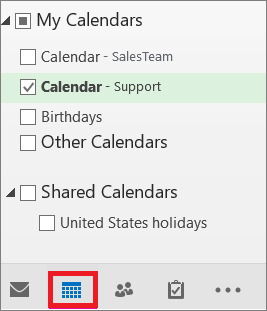
  • Go to Outlook and open the calendar view.
  • Then select the shared mailbox.

You need to know the following things about shared calendars:

  • When you create appointments in a shared calendar, whoever has access to the shared mailbox can see these appointments.
  • Members of shared mailbox can create, view, and edit appointments in the calendar.

Like in the case of shared calendar, the shared contacts are added to your My Contacts list automatically, once the admin allows you to use Outlook shared mailboxes. To access the shared contacts, follow these steps:

  • Launch Outlook and select People.
  • Under My Contacts, select the shared contacts folder.

How to Use Shared Mailbox in Outlook Web Access (OWA)?

If you want to open a shared mailbox in a web browser via OWA, you need to know how to setup a shared mailbox in your account manually. Following are the steps to setup a shared mailbox:

  • Sign in to your OWA account. If you are using Office 365, sign in to your account and launch Outlook.
  • Right-click on a folder or your mailbox in the navigation pane, and click Add shared folder
  • Enter the email ID of your shared mailbox in the dialog box and click Add.

Troubleshooting Shared Mailbox Issues

Outlook stores shared mailboxes data, like other mailbox items, locally in Outlook data file (OST). Sometimes, this OST file gets damaged or becomes inaccessible due to various reasons that include network connection issues, storage device failure, virus infection, etc. The problems with OST file may make your shared folder inaccessible or lead to syncing issues with the shared folder.

In such cases, you can delete and recreate the OST file to resolve the issues. However, if you’re not able to recreate the OST file or there are locally saved items in the file, you can recover the OST file data and save it in Outlook importable PST file by using a specialized OST to PST converter software such as Stellar Converter for OST. The software can easily convert an inaccessible or orphaned OST file into PST, in a few clicks.

Conclusion

Shared mailboxes in Outlook make it easy for small teams to manage and send emails from a common email address. These mailboxes also allow you to share contacts and calendars with the members. It’s easy to use and configure Outlook shared mailbox. You can access the shared mailbox almost instantly after the admin has made you a member.

Sometimes, you face some issues with your shared mailbox. This may usually happened due to problems with the OST file. In such a case, you can recreate the OST file to resolve the issue. If this doesn’t work, you can use an OST converter tool such as Stellar Converter for OST to save your OST file data in Outlook importable PST file.

Microsoft MVP Renewal 2020-2021

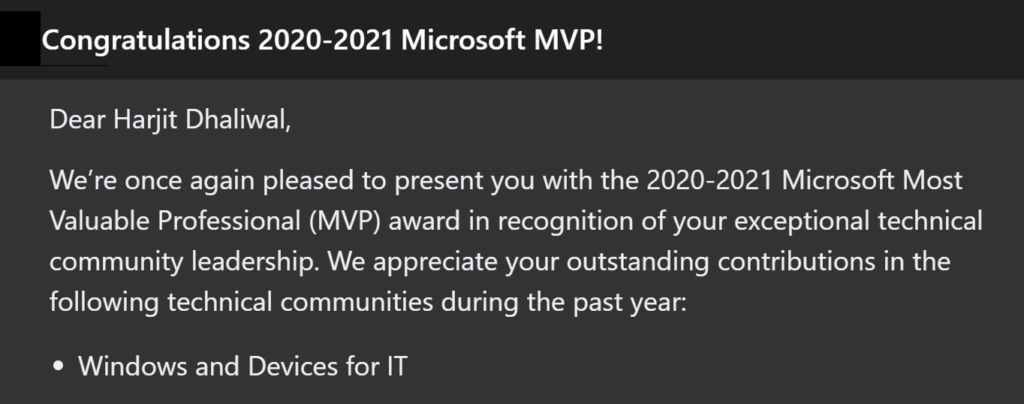
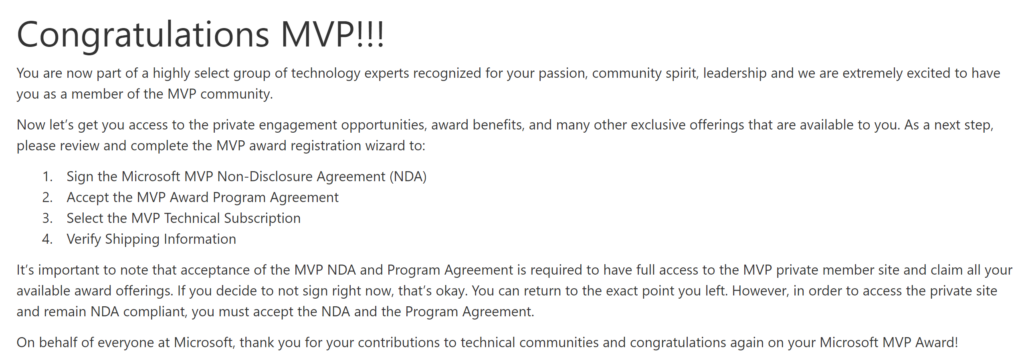
I’m so Thankful, honored, and excited to receive the confirmation email (below) from the Microsoft Most Valuable Professional (MVP) Award team confirming my award renewal for the 2020-2021 year. This is my fourth consecutive award since receiving my first one on January 1, 2017. It has been a wonderful, exciting, fun, challenging, and rewarding experience with so many positive opportunities.

The MVP award has provided me with some great opportunities in terms of my career growth, skill development, and various avenues to give back and help others in the IT Professional community. I had been invited to speak and delivered technical and soft skill sessions at conferences such as Microsoft Ignite Orlando 2019, Midwest Management Summit (MMSMOA), MMS Jazz Edition (New Orleans), and most recently covered the international circuit at Microsoft Ignite The Tour in Milan (Italy), Johannesburg (South Africa), and Dubai (UAE). I was also scheduled to deliver sessions on behalf of Microsoft at Microsoft Ignite The Tour in Zurich (Switzerland), Mumbai (India), Bangalore (India), and Tel Aviv (Israel), however these events were unfortunately cancelled due to COVID-19. I have also delivered various webinars, guest and ghost blogged, joined some technical expert panelist, reviewed technical books, tested and evaluated software, provided technical expertise, guest on podcasts, moderated technical forums, and engaged with the community both in person and online.

This is my 4th MVP Award and I am very grateful and appreciative for this honor and for the various opportunities provided to me over time. Thank you very much to each and every one of you for making me successful in my efforts as a MVP, IT Professional, and community contributor, and for providing me with the valuable resources and networking opportunities. I could not have achieved any of the above without the support and encouragement from the community, my friends in the technology industry, people I look up to as mentors, my mentees who keep me on my toes, wonderful Program Managers at Microsoft, a few industry leaders, and last but not least my loving family. Thank you!

I would like recognize and give my special Thank you to:

* Cathy Moya
* Heather Poulsen
* Betsy Weber
* Rochelle Sonnenberg
* Scott Schnoll

* MVP Award Program

Windows ADK 2004 For Windows 10 Now Available with Add-On

With the release of Windows 10 version 2004, the following tool to support this latest Windows 10 build, Windows Assessment and Deployment Kit (ADK) version 2004 is now available.
You can download it from: Windows 10 Assessment and Deployment Kit (ADK).

NOTE: There is a change with this ADK which requires an add-on installation to include Windows PE.

Starting with Windows 10, version 1809, Windows Preinstallation Environment (PE) is released separately from the Assessment and Deployment Kit (ADK). To add Windows PE to your ADK installation, download the Windows PE Addon and run the included installer after installing the ADK. This change enables post-RTM updates to tools in the ADK. After running the installer for the WinPE add-on, the WinPE files will be in the same location as they were in previous installs of the ADK.

See Download and install the Windows ADK and ADK tools to get the ADK and WinPE add-on.

The Windows ADK is also available to Windows Insiders. Join the Windows Insider Program to get the Windows ADK Insider Preview.

The latest version of the Windows ADK includes:

Windows Performance Recorder (WPR)

New SkipPDBGen Option – During WPR stop, you can now specify in the command line the ability to skip generation of PDBs (NGen & Embedded) to help reduce trace stop time.

  • wpr -stop <recording filename> <Problem description> [-skipPdbGen]

Learn more about Windows ADK v2004 for Windows 10.

ConfigMgr Reporting Error – UserTokenSIDs LDAP Server Unavailable

I recently switched to using my new-ish laptop (Lenovo P1) for my day-to-day technical work and decided I should redo my test lab in Hyper-V, particularly for my ConfigMgr / MEMCM / Intune testing and troubleshooting stuff. While I have been actively using my ConfigMgr site in my lab, I didn’t pay much attention to the built-in reports until very recently, when I discovered I had an issue as all the reports produced an error.

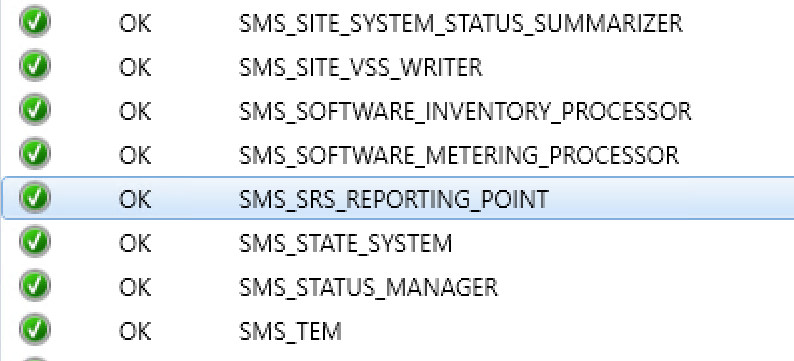
The Component Status in the Monitoring node of the ConfigMgr console indicated no issues with the Reporting Services Point Role.

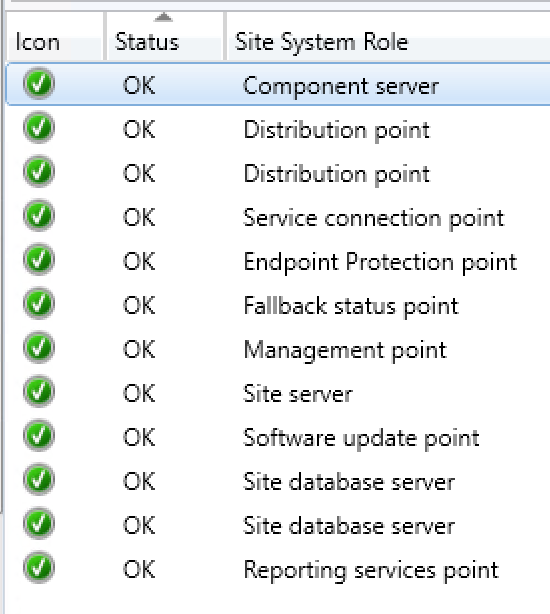
The Site Status was lit up nice and green and indicated all was working fine with my ConfigMgr site.

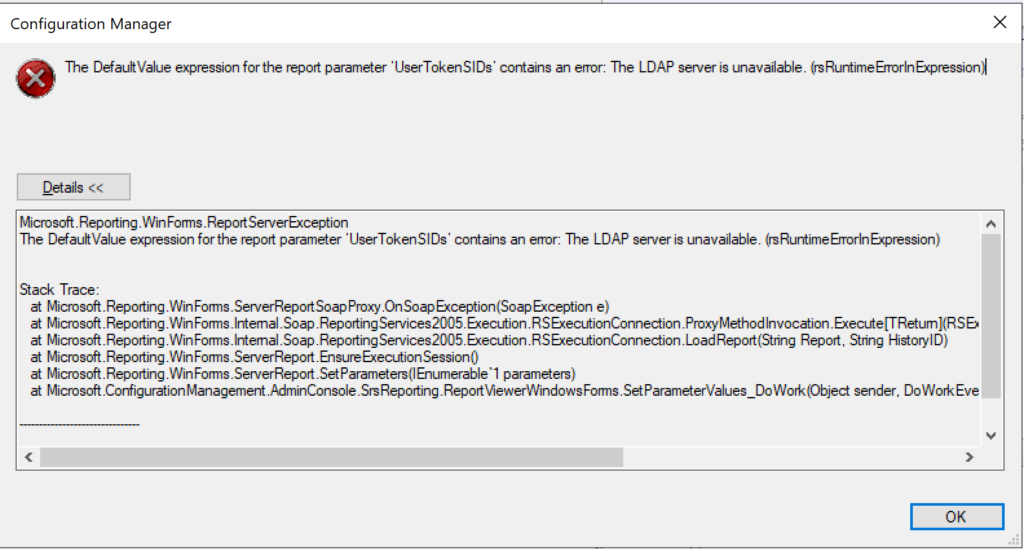
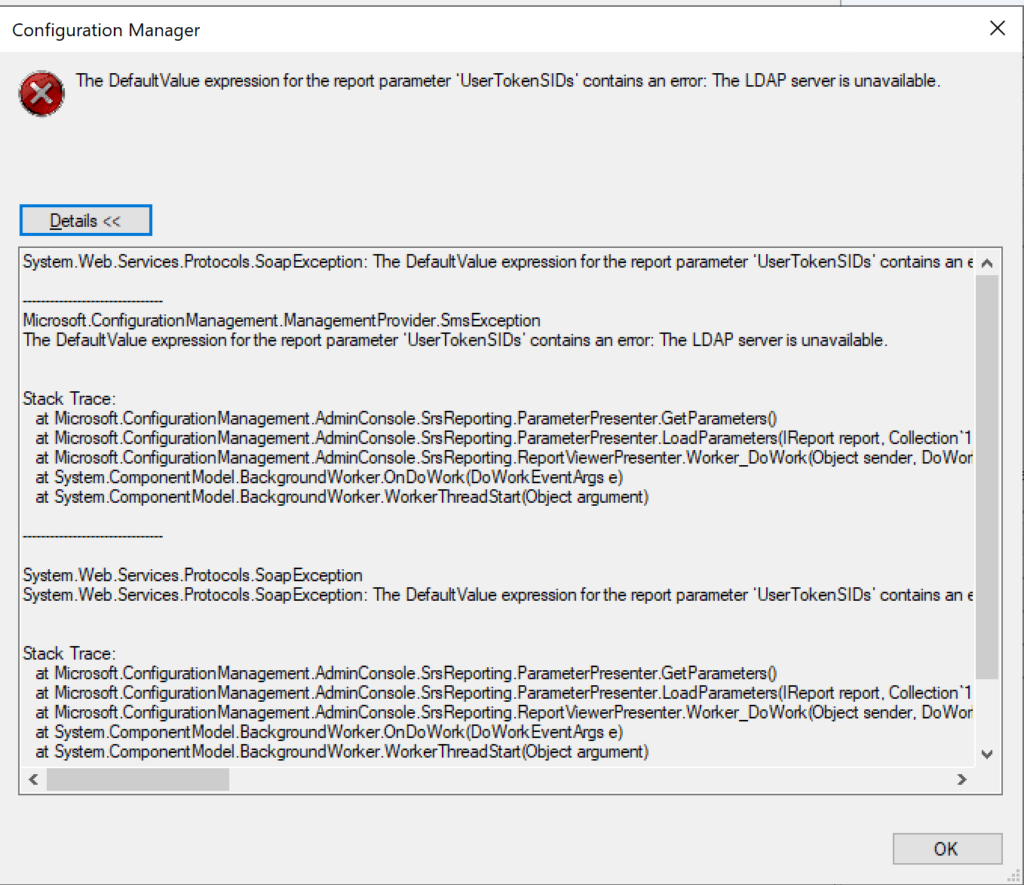
When a report is run from the ConfigMgr console or SSRS, the following error is produced (see image above):

The DefaultValue expression for the report parameter ‘UserTokenSIDs’ contains an error: The LDAP server is unavailable. (rsRuntimeErrorInExpression)

The full error is provided below:

System.Web.Services.Protocols.SoapException: The DefaultValue expression for the report parameter ‘UserTokenSIDs’ contains an error: The LDAP server is unavailable.
at Microsoft.ReportingServices.Library.ReportingService2005Impl.GetReportParameters(String Report, String HistoryID, Boolean ForRendering, ParameterValue[] Values, DataSourceCredentials[] Credentials, ParameterInfoCollection& Parameters)
at Microsoft.ReportingServices.WebServer.ReportingService2005.GetReportParameters(String Report, String HistoryID, Boolean ForRendering, ParameterValue[] Values, DataSourceCredentials[] Credentials, ReportParameter[]& Parameters)


Microsoft.ConfigurationManagement.ManagementProvider.SmsException
The DefaultValue expression for the report parameter ‘UserTokenSIDs’ contains an error: The LDAP server is unavailable.

Stack Trace:
at Microsoft.ConfigurationManagement.AdminConsole.SrsReporting.ParameterPresenter.GetParameters()
at Microsoft.ConfigurationManagement.AdminConsole.SrsReporting.ParameterPresenter.LoadParameters(IReport report, Collection`1 navigationParameters, IResultObject resultObject)
at Microsoft.ConfigurationManagement.AdminConsole.SrsReporting.ReportViewerPresenter.Worker_DoWork(Object sender, DoWorkEventArgs e)
at System.ComponentModel.BackgroundWorker.OnDoWork(DoWorkEventArgs e)
at System.ComponentModel.BackgroundWorker.WorkerThreadStart(Object argument)


I tried several troubleshooting steps including the following:

1. Uninstalled the Reporting role from ConfigMgr
2. Uninstalled the SQL Reporting Services
3. Reinstalled SQL Reporting Services
4. Reinstalled the Reporting role in ConfigMgr
5. Changed the registry key: “HKEY_LOCAL_MACHINE/SOFTWARE/Wow6432Node/Microsoft/ConfigMgr10/
AdminUI/Reporting/ReportBuilderApplicationManifestName” from the value “ReportBuilder_2_0_0_0.application” to “ReportBuilder_3_0_0_0.application”
6. Edited the file:
“C:\Program Files (x86)\Microsoft Configuration
Manager\AdminConsole\bin\Microsoft.ConfigurationManagement.exe.config” and changed the 2 to a 3 in the two locations:
<add key=”10.0″ value=”ReportBuilder_3_0_0_0.application”/>
<add key=”DEFAULT” value=”ReportBuilder_3_0_0_0.application”/>
7. Checked accounts including the service account for SQL reporting

None of the above steps helped fix the UserTokenSIDs issue. I searched high and low on Google / Bing and did not discover anything regarding “LDAP server is unavailable” specifically relating to UserTokenSIDs. I finally got the big guns out and contacted my close friend, Garth Jones, who is a known industry expert with SQL and SSRS. He is a Microsoft MVP and also owns a company called Enhansoft which provides a subscription service for all things reports, which extends the reporting capabilities in ConfigMgr. Enhansoft also provides a free report as a giveaway each month.

RESOLUTION:

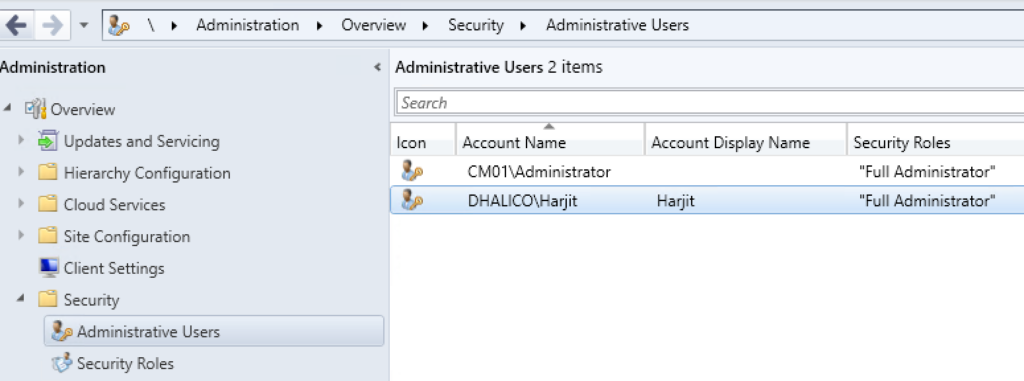
With Garth’s help, the issue was quickly discovered and fixed quite easily. Bottom line is that I was using a local administrator account (CM01\Administrator) to login to my ConfigMgr server as opposed to using a Domain account (Dhalico\Harjit) with the necessary privileges. FYI, “Dhalico” is my domain.
1. Added the Dhalico\Harjit account in the ConfigMgr console under
Administration > Overview > Security > Administrative Users (see image below)
2. Provided “Full Administrator” security role
3. Logged on to the ConfigMgr server as “Harjit” and tested running reports
4. Success! And Thank you Garth! 🙂

How To Install ConfigMgr Client On VDI Template

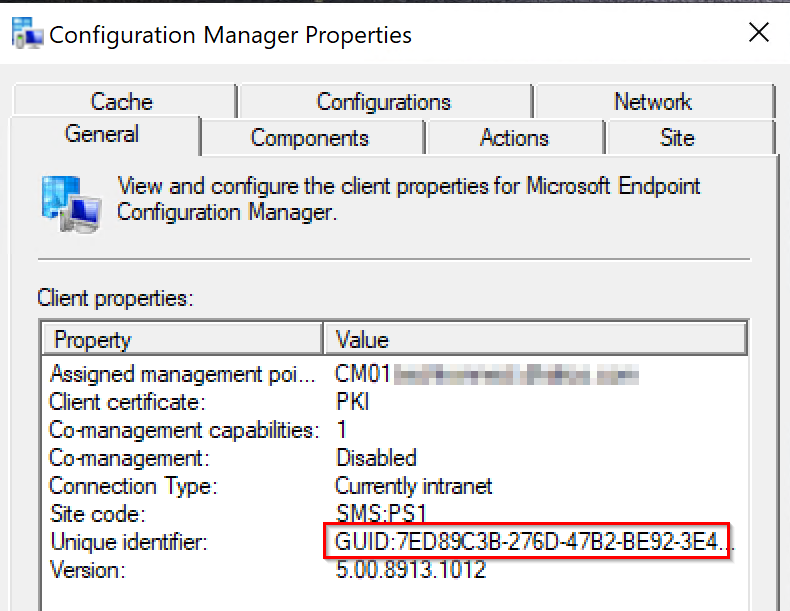
The installation of the ConfigMgr client on workstations and servers is pretty straight forward, and can be done manually, with Client Push, and Software Update Based client installation to name a few. However, it is not as simple when dealing with Windows VDI systems, where extra steps need to be taken to avoid duplicate ConfigMgr client GUIDs and certificates on cloned VDI systems. Below are the steps to follow.

On the master or template system:

  1. Install the ConfigMgr client. Ensure it is properly functioning and has all the necessary components and actions.
  2. Stop the SMS Host Service. This can be done by launching the Command Prompt (CMD) as Administrator and running the following command:
    net stop ccmexec
  3. Delete the SMSCFG.ini file from the Windows folder location. In Administrator CMD, run the following command:
    del %WINDIR%\SMSCFG.ini
  4. Delete the SMS Certificates. To do this, launch PowerShell as Administrator and run the following command:
    Remove-Item -Path HKLM:\Software\Microsoft\SystemCertificates\SMS\Certificates\* -Force
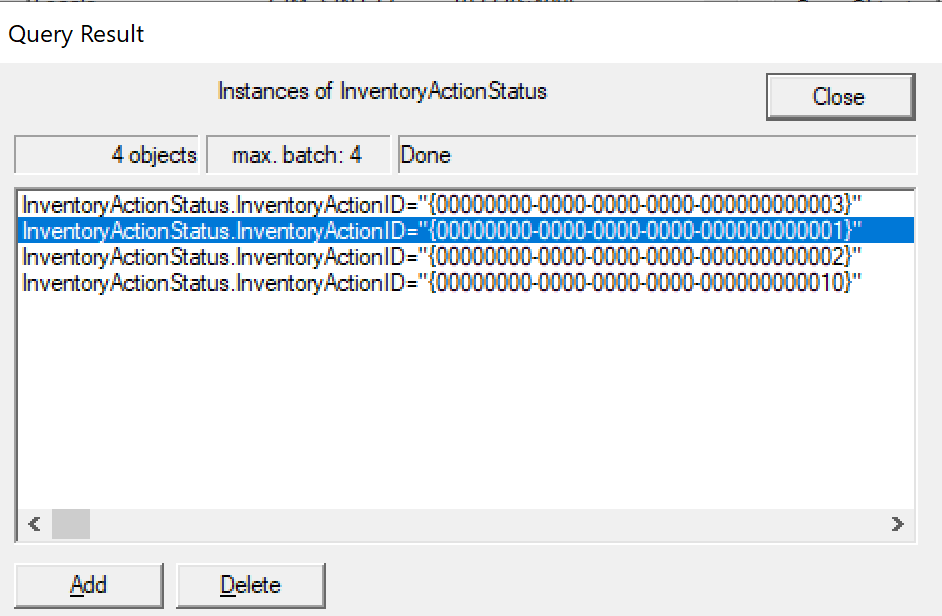
  5. Remove the Inventory Action ID 1 in WMI. You can run the following command:
    wmic /namespace:\root\ccm\invagt path inventoryActionStatus where InventoryActionID=”{00000000-0000-0000-0000-000000000001}” DELETE /NOINTERACTIVE
  6. Once the above steps have been completed, shutdown the master template, capture a snapshot, and provision the VDI systems. At this point, each VDI system will generate a unique ConfigMgr GUID and will function as expected.

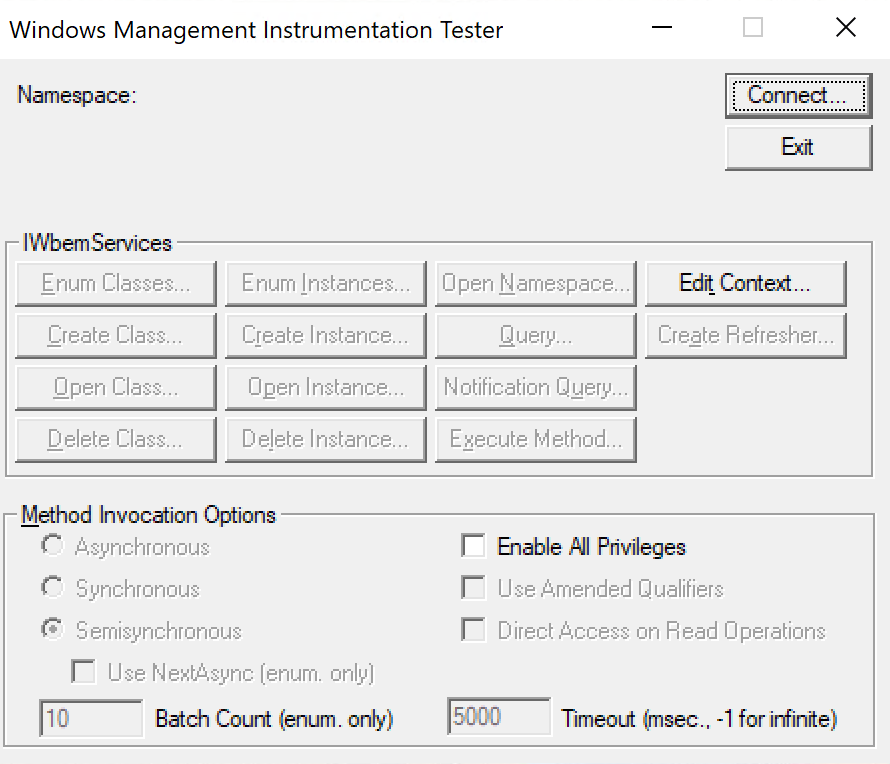
For step number 5, this can be achieved by using the wbemtest tool with the following steps:

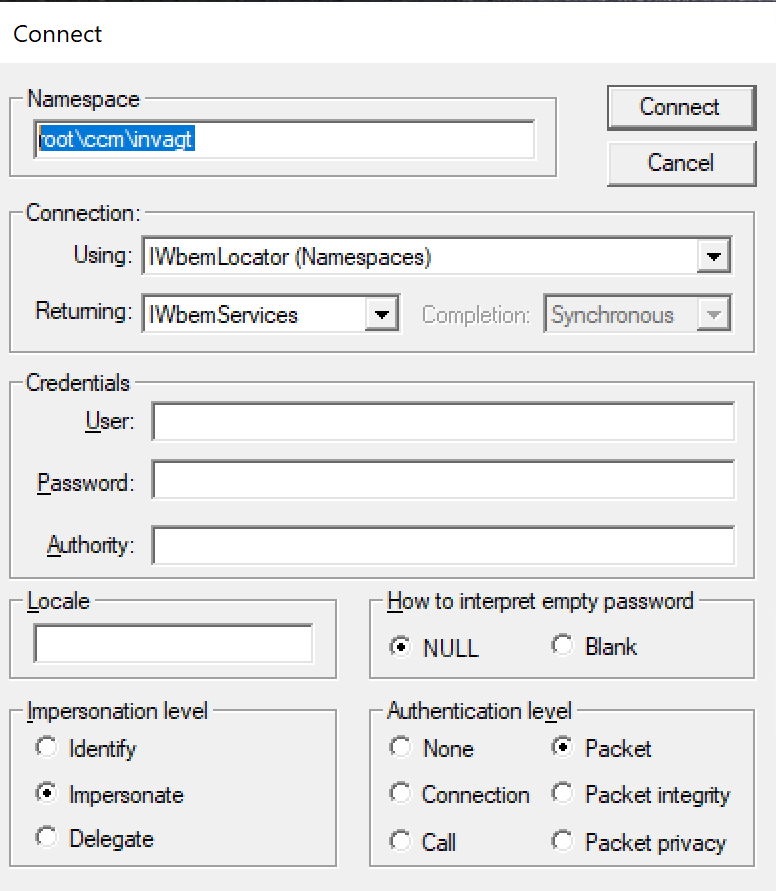
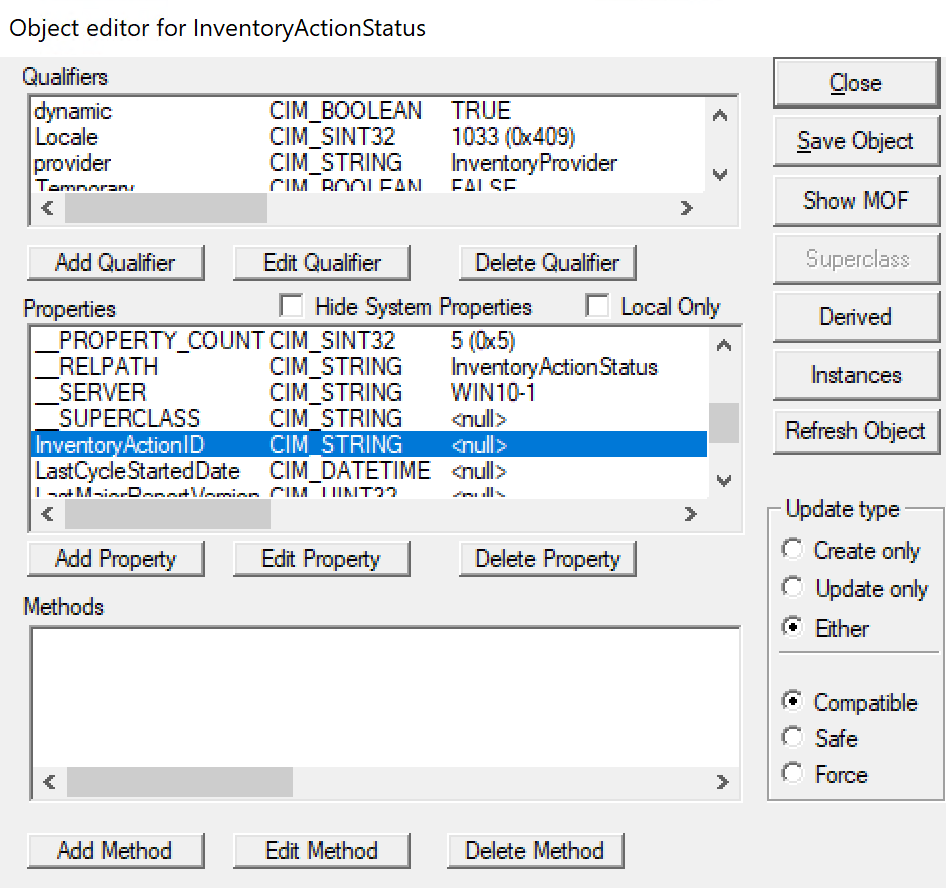
  • Launch wbemtest as Administrator
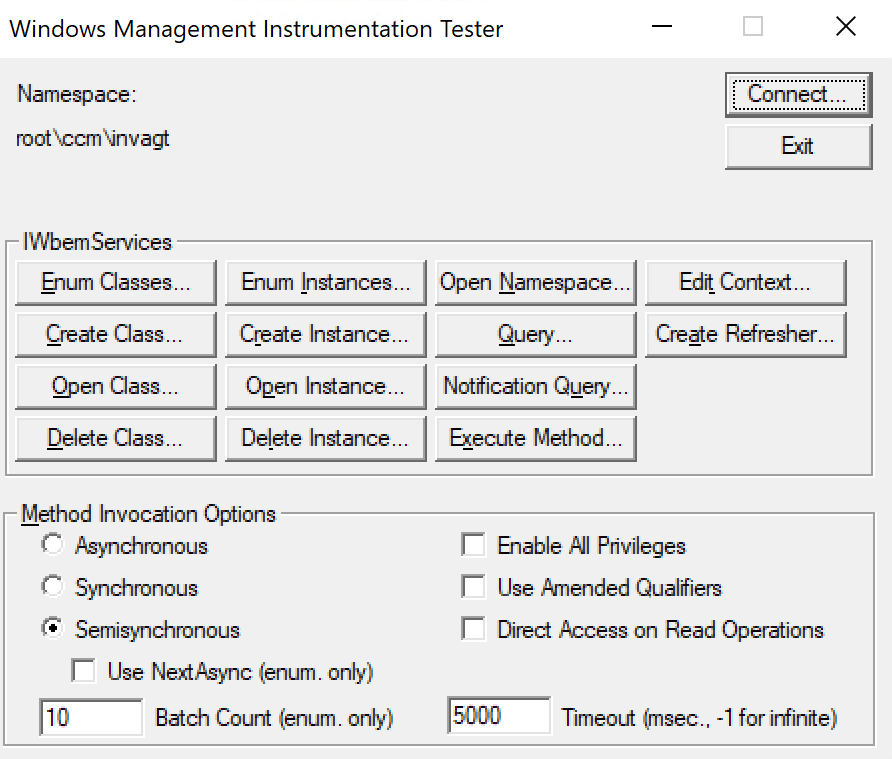
  • Click Connect
  • Change the Namespace field as root\ccm\invagt, and click Connect
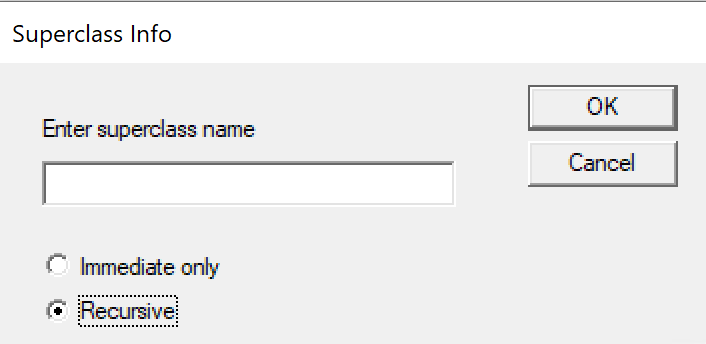
  • Click on Enum Classes
  • Select Recursive and click Ok
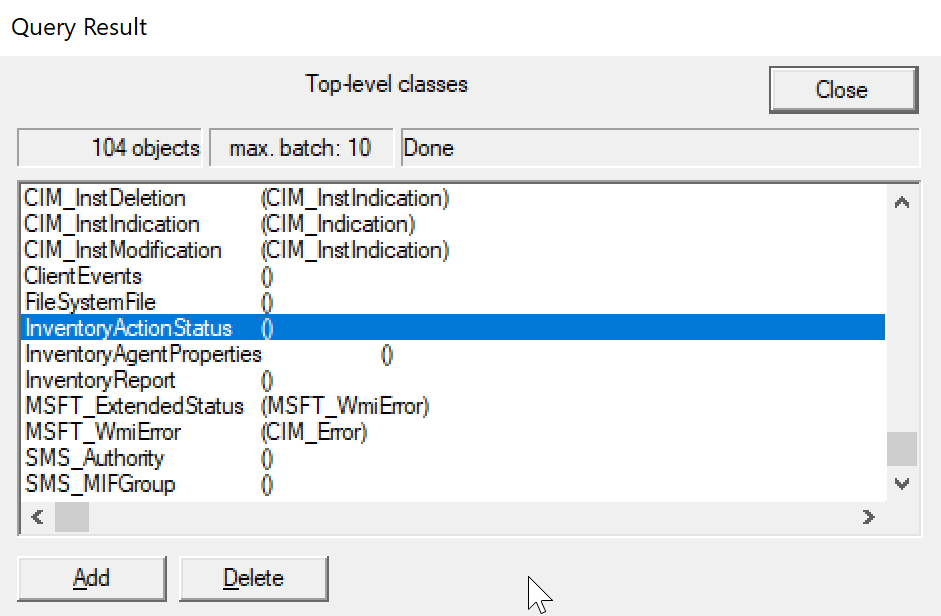
  • Scroll down and locate InventoryActionStatus, and double click
  • Click on the Instances button
  • Select the Inventory GUID and click Delete

Free Azure Training and Exam (AZ-900)

See the source image

I came across this great opportunity from Microsoft for some free Azure training and a free exam voucher for the AZ-900 certification. See below:

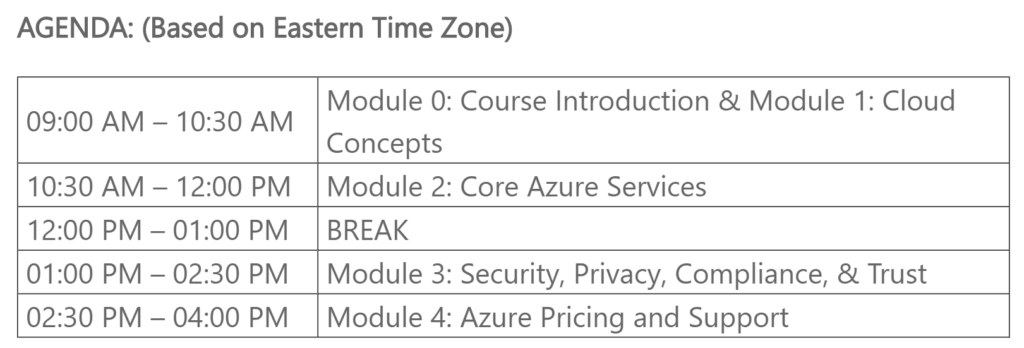
Join us for Microsoft Azure Training Day: Fundamentals to improve your understanding of cloud concepts and acquire the knowledge you need to earn the Microsoft Azure Fundamentals certification. Learn basic strategies for transitioning to the cloud along with concepts including security, high availability, scalability, elasticity, agility, fault tolerance, and disaster recovery.

Attendees will receive free vouchers to take the AZ-900 Microsoft Azure Fundamentals certification exam https://www.microsoft.com/en-us/learning/exam-AZ-900.aspx via email after completion of event.

You will find the sign up links for the free Azure training for different dates and time zones starting from end of April to end of June 2020. Keep in mind that some dates have filled to capacity. Sign Up: https://bit.ly/2VmlZFu

Transportation For MMS Jazz New Orleans

See the source image

MMS Jazz Edition Conference is the 2nd edition of the MMS Conference in 2019, which will be held in New Orleans from November 11-13, 2019. This post will cover the various transportation options such as from the Louis Armstrong New Orleans International Airport (MSY) to the Hotel Monteleone located in the French District, as well as transportation in New Orleans.

Getting from the airport to hotel:

  • Airport Shuttle

Shuttle service is available from the airport to the hotel for $24.00 per person/one-way or $44.00 per person/round-trip. You are limited to 3 bags per person and additional baggage may be subject to extra fees. You can purchase the tickets at Airport Shuttle ticket booths located on the first level throughout the Baggage Claim area at the airport. Visit www.airportshuttleneworleans.com for more information.

  • Taxi

Taxi rides will cost $36.00 from the airport to the French Quarter for up to 2 people. For 3 or more passengers, there will be a $15.00 per additional person charge. Taxi booths are located on the first level outside of Baggage Claim 1 and 14. You have to wait in line at one of these booths for taxi service. They accept credit card payments.

  • Uber and Lyft

Uber and Lyft is available from the Airport. Meet your ride outside of the Ground Transportation Center located on the first floor of the Short-Term Parking Garage by crossing the pedestrian crosswalk located outside of Baggage Claim 6. The cost is approximately $35 one-way. See fare estimators below:
Uber at MSY
Lyft at MSY

  • Car Rental

The Consolidated Rental Car Facility (CONRAC) is available for car rentals from 9 care rental companies (Alamo, Avis, Budget, Dollar, Enterprise, Hertz, National, Payless, Thrifty). To get to CONRAC, exit the Baggage Claim area at level 1 near Baggage Claims 12-14 and take a short walk to the right down a covered walkway to the rental facility. Visit the Rental Information page for more details.

  • Mass Transit

The Jefferson Transit Authority (JET) and the Regional Transportation Authority (RTA) provides 9 daily departures to downtown New Orleans. To utilize this service, you have to use the bus stop located on the outer lanes of the second floor, outside the Concourse C Lobby Information Booth.

The Airport-Downtown Express (E2) Bus operated by JET will cost $2 and takes approximately 50 minutes. More information on JET is available here: www.jeffersontransit.org.

RTA provides the Airport Express (202) Bus service and the fare is $1.50. For more information on the RTA service, visit: https://www.norta.com/Maps-Schedules/System-Map/Line.aspx?ID=202

  • Airport Limousine

If you fancy riding in style in a limousine, you have this option as well from the airport.
A-Airport Limousine is the official service provider for Louis Armstrong New Orleans International Airport. You can request for a limousine at one of the A-Airport Limousine’s kiosks located in the Baggage Claim area on level 1.

Rates will range from $58 for 2 passengers and up to $118 for 8 passengers, and will depend on the type of vehicle. For more information: www.airportlimousineneworleans.com or call 504-305-2450. 

Getting around New Orleans

  • Pedicab

Pedicabs can offer a convenient way to get around the French Quarter and other areas. Pedicabs will cost you $5 for the first 6 blocks and $1 for each additional block per person. These fares are mandated by the city of New Orleans.

The following 3 pedicab companies operate in New Orleans: 
Bike Taxi Unlimited (504-891-3441)
Need a Ride Pedicabs (504-488-6565)
NOLA Pedicabs (504-274-1300)

  • Streetcars

These are iconic and a fun way to travel. In fact, the St. Charles streetcars which is one of the 4 main routes, is the oldest continuously operating streetcar in the world. The streetcar fare is $1.25 one-way and exact change is required. You can purchase the Jazzy Pass or use the Go Mobile smartphone app.

Board one of the dark green colored streetcars at Carondelet and Canal Street and let it take you through the Central Business District, the Garden District and past the uptown universities.

The red and yellow Canal streetcars offer two options: a direct route to the cemeteries or a trip to the entrance of City Park and the New Orleans Museum of Art. When boarding from Canal Street in the French Quarter, pay attention to the signs on the front of the streetcar for which option to choose.

The Riverfront line offers easy transportation between the French Market and the Aquarium of the Americas and Riverwalk area, while the Loyola Avenue/Union Passenger Terminal loop makes it easy to get from the Amtrak train and Greyhound bus stations to the French Quarter.

  • Other

Hop-On Hop-Off sight-seeing bus: https://www.citysightseeingneworleans.com/
Rent-A-Bike: https://neworleansbiketour.com/
Segway: https://www.citysegwaytours.com/new-orleans/tours/day-segway-tour
Uber and Lyft

Hope this information is helpful for your transportation needs and for your visit to New Orleans. Enjoy #MMSJazz which is going to be a great event.