On October 14, 2025, Microsoft officially ended support for Windows 10. That means no more free security updates, feature enhancements, or technical support.
For IT admins and organizations still running Windows 10, the clock has stopped, and the risk has begun. Unpatched systems are now increasingly exposed to security threats, compliance gaps, and software compatibility issues.
This isn’t just another upgrade cycle. Moving to Windows 11 is about embracing a more secure, intelligent, and cloud-ready operating system built for the modern workplace.
What End of Support Really Means
As of October 14, 2025, Microsoft no longer provides: – Security updates or patches – Non-security updates or bug fixes – Technical support (unless you pay for Extended Security Updates aka ESU) – Driver and firmware updates through Windows Update
The Extended Security Update (ESU) program is available as a temporary bridge, but it’s costly, limited, and requires a Microsoft account. Even then, it only extends security coverage through October 2028, without feature or reliability updates.
In other words: ESUs keep the lights on, but they don’t modernize your environment. It’s time to plan or accelerate your move to Windows 11.
Why Migrate to Windows 11 Now
1. Modern Security by Default
Windows 11 raises the baseline for endpoint protection: – TPM 2.0 and Secure Boot enforce hardware-based root-of-trust. – Windows Hello for Business enables passwordless authentication. – Smart App Control blocks untrusted and unsigned executables. – Pluton security processor (on supported devices) keeps credentials isolated from firmware-level attacks. – Built-in ransomware protection, Credential Guard, and Zero Trust integration with Microsoft Entra ID.
2. Cloud-Native Management
Windows 11 was built for the cloud. Modern management through Microsoft Intune and Windows Autopilot allows organizations to: – Provision and deploy new devices with zero-touch setup. – Enforce configuration baselines, policies, and compliance. – Manage hybrid or remote users without traditional domain dependencies. – Integrate with Windows Autopatch for continuous automated update cycles.
Windows 11 enhances usability and performance: – Snap Layouts and Snap Groups improve multitasking. – AI-powered Windows Copilot assists with tasks and automation. – Deep Microsoft 365 integration improves collaboration. – Battery and performance optimizations extend hardware value. – Windows 365 Cloud PC enables access to personalized desktops anywhere.
5. Accessibility and Inclusion
Windows 11 includes: – Live Captions for real-time transcription. – Voice Access for hands-free control. – Natural Narrator voices and Focus Sessions. These enhancements make Windows 11 more inclusive for all users.
Migration Paths and Tools for IT Pros
1. Upgrade In-Place: Use Windows Update for Business, Windows Autopatch, SCCM, or Intune Feature Update Policy. 2. Replace Legacy Hardware: Refresh devices that don’t meet TPM 2.0 or CPU requirements. 3. Cloud-Native Reprovisioning: Deploy via Windows Autopilot, Intune, or Entra ID Join.
Tools: – Microsoft Intune – Windows Autopatch – Endpoint Analytics – MDT/SCCM – Third-party tools
Post-Migration Recommendations
1. Enable Windows Autopatch for automated updates. 2. Integrate with Intune for lifecycle management. 3. Use Endpoint Analytics to monitor performance. 4. Align compliance policies with Zero Trust. 5. Train users on Windows 11’s new features.
What Happens If You Stay on Windows 10?
Remaining on Windows 10 beyond October 2025 means: – No free security updates (only paid ESUs). – Increased vulnerability to attacks. – Compliance and regulatory risks. – Software incompatibility as vendors move on.
Final Thoughts
The Windows 10 era is officially over. Windows 11 is a modern, secure, and cloud-native platform built for the future of work. With Microsoft Intune, Windows Autopilot, and Autopatch, organizations can simplify management, enhance security, and stay productive.
Now is the time to move forward, because the best way to stay secure, productive, and compliant is to leave Windows 10 behind.
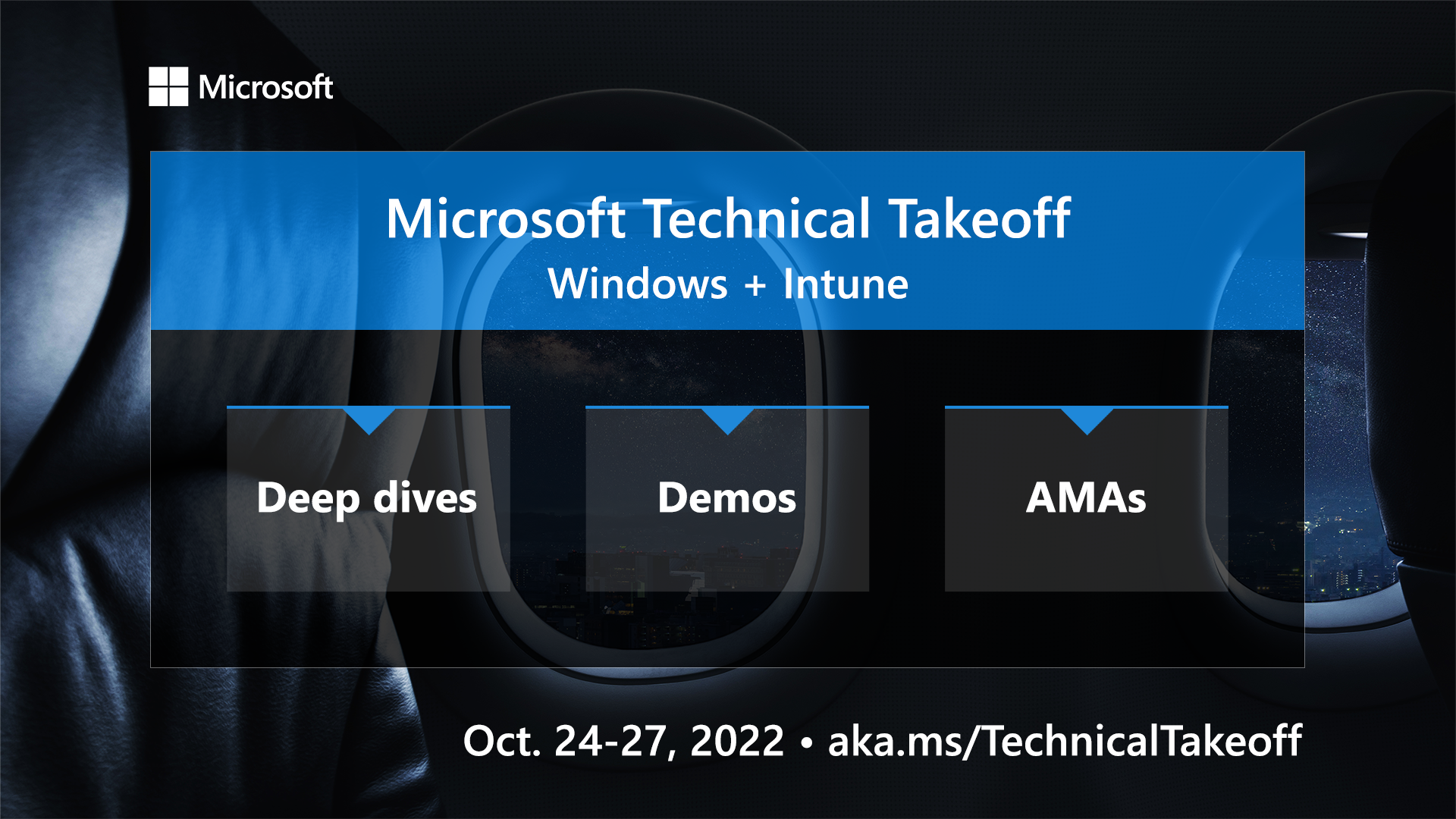
Join Microsoft for four days of demos, deep dives, and live Ask Microsoft Anything (AMA) sessions from October 24-27, 2022, led by Microsoft engineering and designed to get you up to speed on the latest features, capabilities, and scenarios for Windows11 and Microsoft Intune, including Windows 365 and much more. There will be experts from the engineering and product teams ready to answer your questions during each session.
How do you participate? Go to https://aka.ms/TechnicalTakeoff and select the sessions you want to attend, and then click on RSVP to save your spot, receive event reminders, and have the ability to post your questions in advance and also during the event. (Note: You must be signed in to the Tech Community to RSVP and participate in the live Q&A, but sessions can be viewed without signing in). See the video below for a quick tutorial on how to sign up.
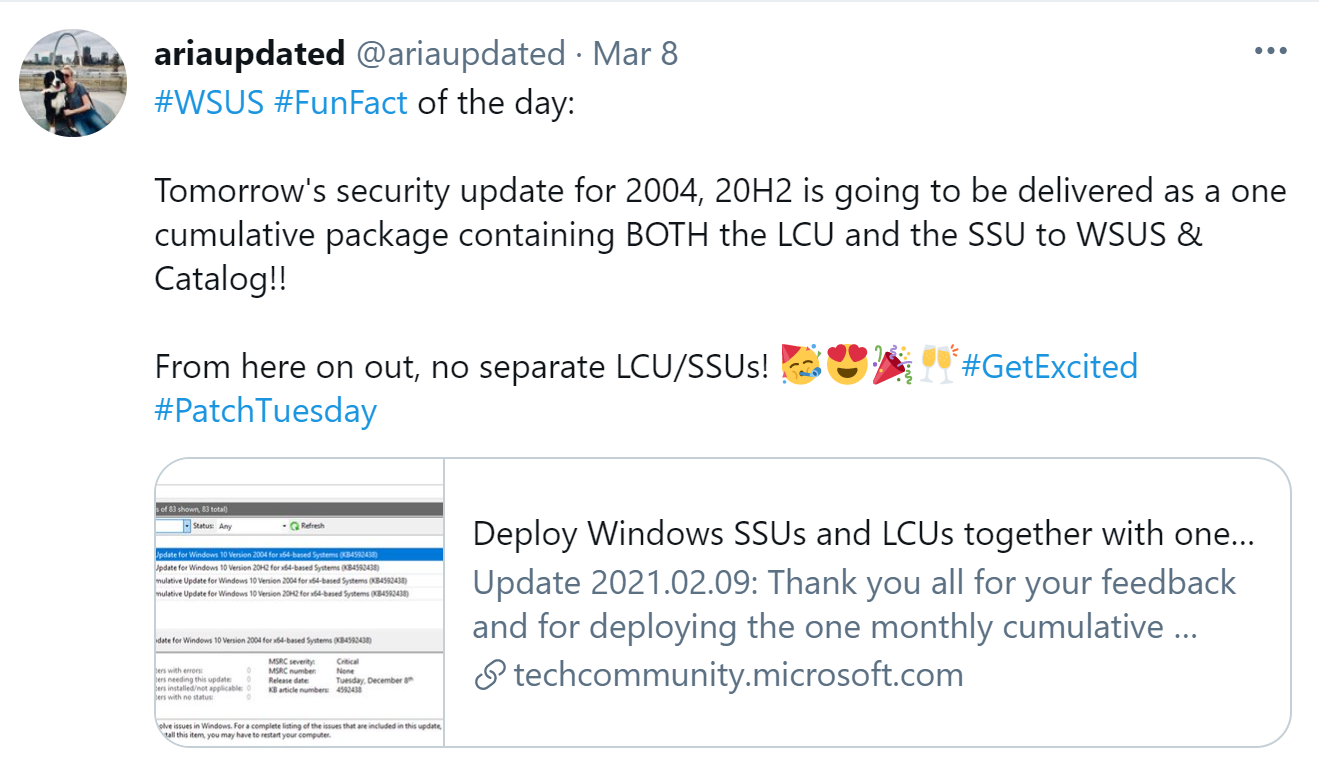
The tweet below has been liked, shared, and retweeted by IT pros with lots of excitement for this awesome event. Follow me on Twitter and help amplify this message. Thanks.
See below for a listing of the deep dive sessions, demos, AMAs, and the Office Hours.
All times below listed for Pacific Daylight Time (PDT)
As of Sunday, October 23, 2022, we have added a Microsoft Edge AMA on Wednesday, October 26th at 12PM PT. Check it out: https://aka.ms/TTAMA/MicrosoftEdge.
I’m excited for this event which a handful of us at Microsoft helped organize, planned and produced this amazing technical event for IT pros. Looking forward to seeing you at Microsoft Technical event, for you learning, and engagements.
Update sign and text on a computer keyboard button 3D illustration.
Microsoft has released fixes for 82 vulnerabilities, with 10 updates classified as Critical and 72 as Important. Here’s an updated announcement (2021-02-09) from Microsoft: Deploy Windows SSUs and LCUs together with one cumulative update –
Beginning with the February 2021 LCU, we will now publish all future cumulative updates and SSUs for Windows 10, version 2004 and above together as one cumulative monthly update to the normal release category in WSUS.
UPDATE – 2021-03-14: DYMO Label Printer fix for BSOD issues.
UPDATE – 2021-03-13: Microsoft shares temporary fix for Windows 10 printing crashes
UPDATE – 2013-03-13: Updates on Microsoft Exchange Server Vulnerabilities (CISA)
UPDATE– 2021-03-10: Windows 10 KB5000802 (March) update is crashing PCs with BSOD Windows 10 BSOD crashes include the both workstation and server versions running March 2021 cumulative updates:
KB5000802: Windows 10 2004/20H2 & Windows Server 2004/20H2
Zero-Day Vulnerabilities Fixes: 1. Internet Explorer Memory Corruption Vulnerability (CVE-2021-26411) 2. Internet Explorer Remote Code Execution Vulnerability (CVE-2021-27085) 3. Windows Win32k Elevation of Privilege Vulnerability (CVE-2021-27077) 4. Microsoft Exchange Server Remote Code Execution Vulnerability (CVE-2021-27078)
Microsoft released out-of-band security updates for the ProxyLogon vulnerability that are actively being used by threat actors worldwide to compromise Microsoft Exchange servers.
These vulnerabilities are being tracked with the following CVEs:
CVE-2021-26855 – Microsoft Exchange Server Remote Code Execution Vulnerability
CVE-2021-26857 – Microsoft Exchange Server Remote Code Execution Vulnerability
CVE-2021-26858 – Microsoft Exchange Server Remote Code Execution Vulnerability
CVE-2021-27065 – Microsoft Exchange Server Remote Code Execution Vulnerability
Microsoft has released security updates for currently supported Microsoft Exchange cumulative updates and older unsupported versions.
Microsoft has released a PowerShell script called Test-ProxyLogon.ps1 that will check for indicators of compromise (IOC) in Exchange HttpProxy logs, Exchange log files, and Windows Application event logs.
Windows 10 v2004 and Windows 10 v20H2: 5000802 Windows 10 v1909: 5000808 Windows 10 v1809: 5000822 Windows 10 v1803: 5000809
Windows Server 2019, Windows Server 2016, and Server Core installations (2019, 2016, v20H2, v2004, and v1909)
Critical
Remote Code Execution
Windows Server 2019: 5000822 Windows Server 2016: 5000803 Windows Server v2004 and Windows Server v20H2: 5000802 Windows Server v1909: 5000808
Windows 8.1, Windows Server 2012 R2, and Windows Server 2012
Critical
Remote Code Execution
Windows 8.1 and Windows Server 2012 R2 Monthly Rollup: 5000848 Windows 8.1 and Windows Server 2012 R2 Security Only: 5000853 Windows Server 2012 Monthly Rollup: 5000847 Windows Server 2012 Security Only: 5000840
With so many people working remotely, it is a good time to review guidance on deploying security updates to remote devices, such as desktops, laptops, and tablets. Here are some resources to answer questions pertaining to deploying updates to remote devices.
Below are summaries for some of the security vulnerabilities in this release. These specific vulnerabilities were selected from the larger set of vulnerabilities in the release for one or more of the following reasons: 1) We received inquiries regarding the vulnerability; 2) the vulnerability may have received attention in the trade press; or 3) the vulnerability is potentially more impactful than others in the release. Because we do not provide summaries for every vulnerability in the release, you should review the content in the Security Update Guide for information not provided in these summaries.
Notes on details in the vulnerability summaries:
Attack Vector
This metric reflects the context by which vulnerability exploitation is possible. The Base Score increases the more remote (logically, and physically) an attacker can be in order to exploit the vulnerable component.
Attack Complexity
This metric describes the conditions beyond the attacker’s control that must exist in order to exploit the vulnerability. Such conditions may require the collection of more information about the target or computational exceptions. The assessment of this metric excludes any requirements for user interaction in order to exploit the vulnerability. If a specific configuration is required for an attack to succeed, the Base metrics should be scored assuming the vulnerable component is in that configuration.
Privileges Required
This metric describes the level of privileges an attacker must possess before successfully exploiting the vulnerability.
User Interaction
This metric captures the requirement for a user, other than the attacker, to participate in the successful compromise the vulnerable component. This metric determines whether the vulnerability can be exploited solely at the will of the attacker, or whether a separate user (or user-initiated process) must participate in some manner.
CVE-2021-24089
HEVC Video Extensions Remote Code Execution Vulnerability
Windows Error Reporting Elevation of Privilege Vulnerability
Impact
Elevation of Privilege
Severity
Important
Publicly Disclosed?
No
Known Exploits?
No
Exploitability
Exploitation less likely
CVSS Score Metrics
Base CVSS Score: 7.8
Privileges Required: None
Confidentiality: High
Attack Vector: Local
User Interaction: Required
Integrity: High
Attack Complexity: Low
Scope: Unchanged
Availability: High
Affected Software:
Windows 10 Version 20H2, Windows 10 Version 2004, Windows 10 Version 1909, Windows Server, version 20H2, Windows Server, version 2004, and Windows Server, version 1909
Windows Hyper-V Remote Code Execution Vulnerability
Impact
Remote Code Execution
Severity
Critical
Publicly Disclosed?
No
Known Exploits?
No
Exploitability
Exploitation less likely
CVSS Score Metrics
Base CVSS Score: 9.9
Privileges Required: Low
Confidentiality: High
Attack Vector: Network
User Interaction: None
Integrity: High
Attack Complexity: Low
Scope: Changed
Availability: High
Affected Software:
Windows 10 Version 20H2, Windows 10 Version 2004, Windows 10 Version 1909, Windows Server, version 20H2, Windows Server, version 2004, and Windows Server, version 1909
Windows DNS Server Remote Code Execution Vulnerability
Impact
Remote Code Execution
Severity
Critical
Publicly Disclosed?
No
Known Exploits?
No
Exploitability
Exploitation more likely
CVSS Score Metrics
Base CVSS Score: 9.8
Privileges Required: None
Confidentiality: High
Attack Vector: Network
User Interaction: None
Integrity: High
Attack Complexity: Low
Scope: Unchanged
Availability: High
Affected Software:
Windows Server, version 20H2, Windows Server, version 2004, Windows Server, version 1909, Windows Server 2019, Windows Server 2016, Windows Server 2012 R2, and Windows Server 2012
Internet Explorer 11 on Windows 10 Version 20H2, Windows 10 Version 2004, Windows 10 Version 1909, Windows 10 Version 1809, Windows 10 Version 1803, Windows 8.1, Windows Server 2019, Windows Server 2016, Windows Server 2012 R2, and Windows Server 2012 and Microsoft Edge (EdgeHTML-based) on Windows 10 Version 20H2, Windows 10 Version 2004, Windows 10 Version 1909, Windows 10 Version 1809, Windows 10 Version 1803, Windows Server 2019, and Windows Server 2016
Microsoft has released fixes for 56 vulnerabilities, with 11 updates classified as Critical and 43 as Important. Here’s an updated announcement (2021-02-09) from Microsoft: Deploy Windows SSUs and LCUs together with one cumulative update –
Beginning with the February 2021 LCU, we will now publish all future cumulative updates and SSUs for Windows 10, version 2004 and above together as one cumulative monthly update to the normal release category in WSUS.
Microsoft has also released Intel microcode updates for Windows 10 20H2, 2004, 1909, and older versions to fix issues impacting current and previously released Windows 10 versions.
These microcode updates are offered to affected devices via Windows Update but they can also be manually downloaded directly from the Microsoft Catalog using these links:
KB4589212: Intel microcode updates for Windows 10, version 2004 and 20H2, and Windows Server, version 2004 and 20H2
KB4589211: Intel microcode updates for Windows 10, version 1903 and 1909, and Windows Server, version 1903 and 1909
KB4589208: Intel microcode updates for Windows 10, version 1809 and Windows Server 2019
KB4589206: Intel microcode updates for Windows 10, version 1803
KB4589210: Intel microcode updates for Windows 10, version 1607 and Windows Server 2016
KB4589198: Intel microcode updates for Windows 10, version 1507
On February 9, 2021, Microsoft released security updates affecting the following Microsoft products:
Windows 10 v2004 and Windows 10 v20H2: 4601319 Windows 10 v1909: 4601315 Windows 10 v1809: 4601345 Windows 10 v1803: 4601354
Windows Server 2019, Windows Server 2016, and Server Core installations (2019, 2016, v20H2, v2004, and v1909)
Critical
Remote Code Execution
Windows Server 2019: 4601345 Windows Server 2016: 4601318 Windows Server v2004 and Windows Server v20H2: 4601319 Windows Server v1909: 4601315
Windows 8.1, Windows Server 2012 R2, and Windows Server 2012
Critical
Remote Code Execution
Windows 8.1 and Windows Server 2012 R2 Monthly Rollup: 4601384 Windows 8.1 and Windows Server 2012 R2 Security Only: 4601349 Windows Server 2012 Monthly Rollup: 4601348 Windows Server 2012 Security Only: 4601357
Below are summaries for some of the security vulnerabilities in this release:
Attack Vector
This metric reflects the context by which vulnerability exploitation is possible. The Base Score increases the more remote (logically, and physically) an attacker can be in order to exploit the vulnerable component.
Attack Complexity
This metric describes the conditions beyond the attacker’s control that must exist in order to exploit the vulnerability. Such conditions may require the collection of more information about the target or computational exceptions. The assessment of this metric excludes any requirements for user interaction in order to exploit the vulnerability. If a specific configuration is required for an attack to succeed, the Base metrics should be scored assuming the vulnerable component is in that configuration.
Privileges Required
This metric describes the level of privileges an attacker must possess before successfully exploiting the vulnerability.
User Interaction
This metric captures the requirement for a user, other than the attacker, to participate in the successful compromise the vulnerable component. This metric determines whether the vulnerability can be exploited solely at the will of the attacker, or whether a separate user (or user-initiated process) must participate in some manner.
CVE-2021-1727
Windows Installer Elevation of Privilege Vulnerability
Windows Win32k Elevation of Privilege Vulnerability
Impact
Elevation of Privilege
Severity
Important
Publicly Disclosed?
No
Known Exploits?
Yes
Exploitability
Exploitation detected
CVSS Base Score
7.8
Attack Vector
Local
Attack Complexity
Low
Privileges Required
Low
User Interaction
None
Scope
Unchanged
Confidentiality
High
Integrity
High
Availability
High
Affected Software
Windows 10 v20H2, Windows 10 v2004, Windows 10 v1909, Windows 10 v1809, Windows 10 v1803, Windows Server v20H2, Windows Server v2004, Windows Server v1909, and Windows Server 2019
Windows DNS Server Remote Code Execution Vulnerability
Impact
Remote Code Execution
Severity
Critical
Publicly Disclosed?
No
Known Exploits?
No
Exploitability
Exploitation more likely
CVSS Base Score
9.8
Attack Vector
Network
Attack Complexity
Low
Privileges Required
None
User Interaction
None
Scope
Unchanged
Confidentiality
High
Integrity
High
Availability
High
Affected Software
Windows Server v20H2, Windows Server v2004, Windows Server v1909, Windows Server 2019, Windows Server 2016, Windows Server 2012 R2, and Windows Server 2012
Windows Console Driver Denial of Service Vulnerability
Impact
Denial of Service
Severity
Important
Publicly Disclosed?
Yes
Known Exploits?
No
Exploitability
Exploitation less likely
CVSS Base Score
5.5
Attack Vector
Local
Attack Complexity
Low
Privileges Required
None
User Interaction
Required
Scope
Unchanged
Confidentiality
None
Integrity
None
Availability
High
Affected Software
Windows 10 v20H2, Windows 10 v2004, Windows 10 v1909, Windows 10 v1809, Windows 10 v1803, Windows Server v20H2, Windows Server v2004, Windows Server v1909, and Windows Server 2019
Microsoft SharePoint Remote Code Execution Vulnerability
Impact
Remote Code Execution
Severity
Important
Publicly Disclosed?
No
Known Exploits?
No
Exploitability
Exploitation more likely
CVSS Base Score
8.8
Attack Vector
Network
Attack Complexity
Low
Privileges Required
Low
User Interaction
None
Scope
Unchanged
Confidentiality
High
Integrity
High
Availability
High
Affected Software
Microsoft SharePoint Server 2019, Microsoft SharePoint Enterprise Server 2016, Microsoft SharePoint Foundation 2013 Service Pack 1, and Microsoft SharePoint Foundation 2010 Service Pack 2
Microsoft Excel Remote Code Execution Vulnerability
Impact
Remote Code Execution
Severity
Important
Publicly Disclosed?
No
Known Exploits?
No
Exploitability
Exploitation less likely
CVSS Base Score
7.8
Attack Vector
Local
Attack Complexity
Low
Privileges Required
None
User Interaction
Required
Scope
Unchanged
Confidentiality
High
Integrity
High
Availability
High
Affected Software
Microsoft 365 Apps for Enterprise, Excel 2016, Excel 2013, Excel 2010, Office Online Server, Office 2019, Office 2019 for Mac, and Office Web Apps Server 2013
This month’s Office security updates address bugs exposing Windows systems running vulnerable Click to Run and Microsoft Installer (.msi) based editions of Microsoft Office products to remote code execution (RCE), information disclosure, and spoofing attacks.
Microsoft rated the six RCE bugs patched in February 2021 as Important severity issues given that they could enable attackers to execute arbitrary code in the context of the currently logged-in user.
Following successful exploitation, attackers could install malicious programs, view, change, and delete data, as well as make their own admin accounts on exploited Windows devices.
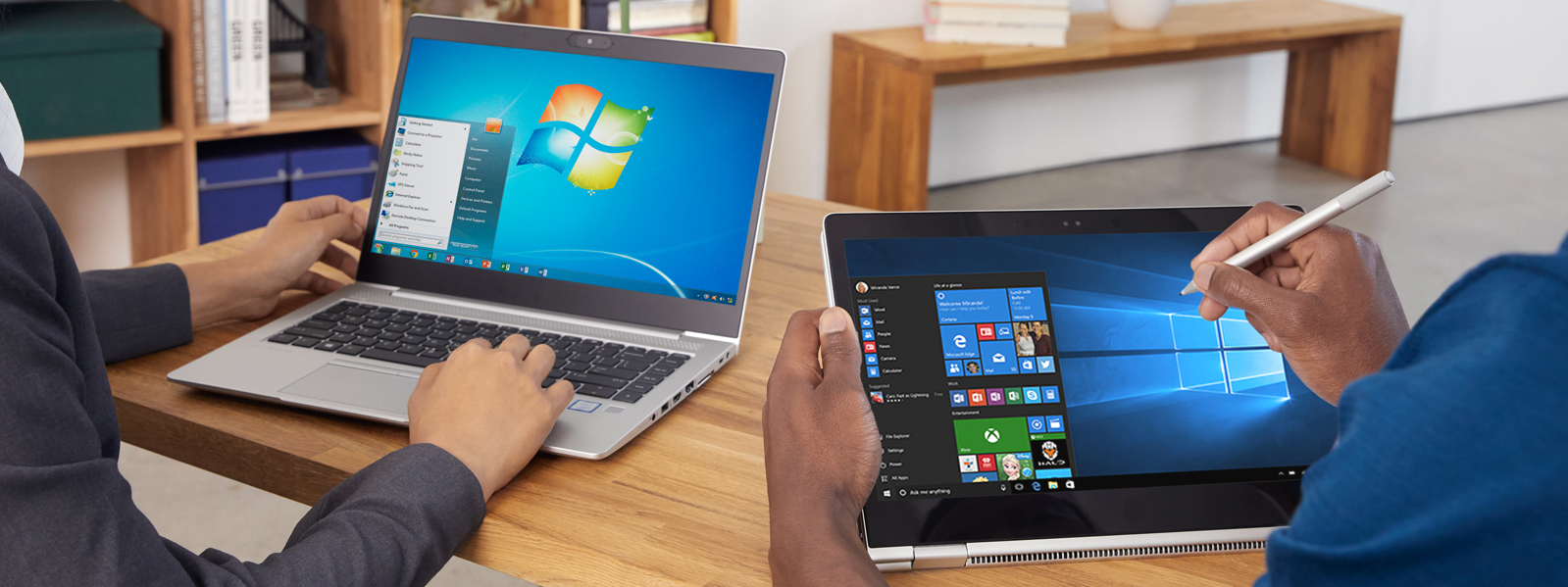
Starting January 14, 2020, Microsoft will no longer provide security updates, software updates and technical support for computers running Windows 7. Start upgrading the Windows 7 computers in your organizations or in your homes to Windows 10 ASAP.
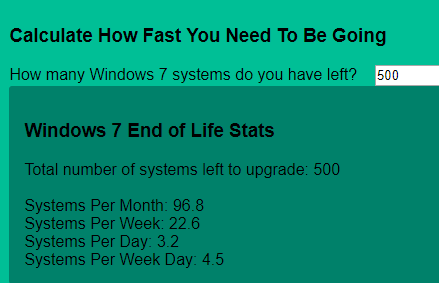
This website, Windows 7 End of Life provides a nice countdown along with a calculator to determine how many computers you will need to upgrade per month, per week, or per day given the number of Windows 7 computers you have left to upgrade.
Nash Pherson, the creator of the Win 7 End of Life website also provides a nice PowerShell script to find all the Windows 7 computer objects remaining in your Active Directory. Great resource, Thanks Nash!
This is the Windows Lifecycle Fact Sheet for every Windows product available, which provides information for support timelines and more.
Starting with Windows 10 “19H1” or build 18237, you have likely encountered a blurred background on the login screen. Some users like this feature and some don’t. If you’d like to change the blurred effect to a clear image, then you can do it in two ways: 1. Group Policy or Local Policy 2. Registry setting
Change using Group Policy or Local Policy:
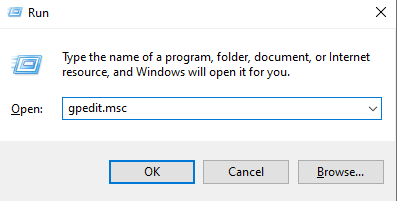
Launch the Group Policy Editor > gpedit.msc
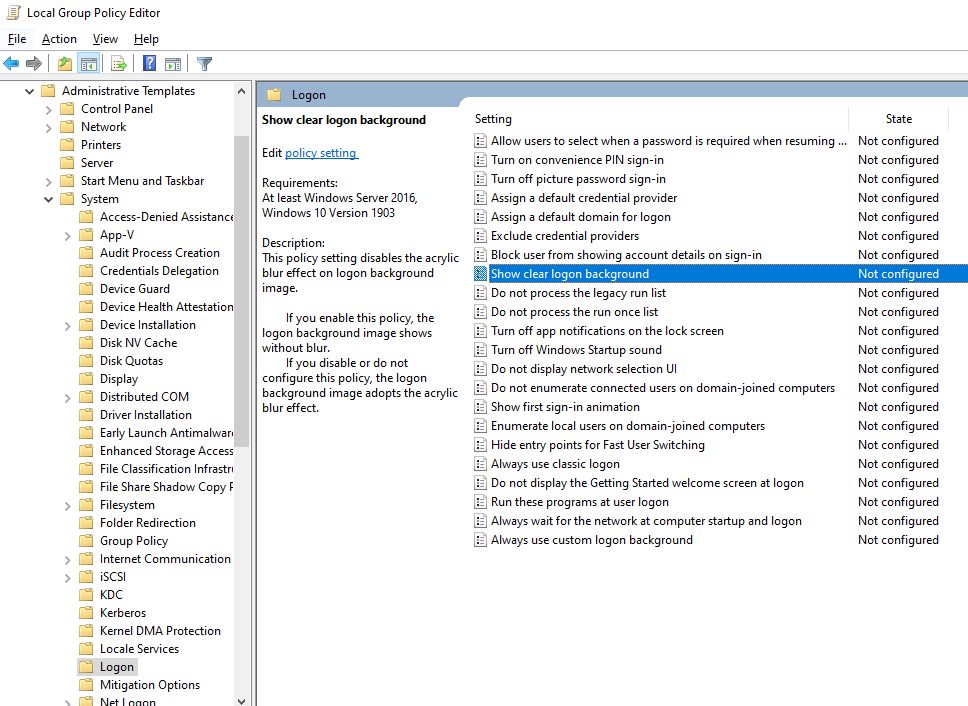
In Group Policy Editor, go to: Computer Configuration\Administrative Templates\System\Logon
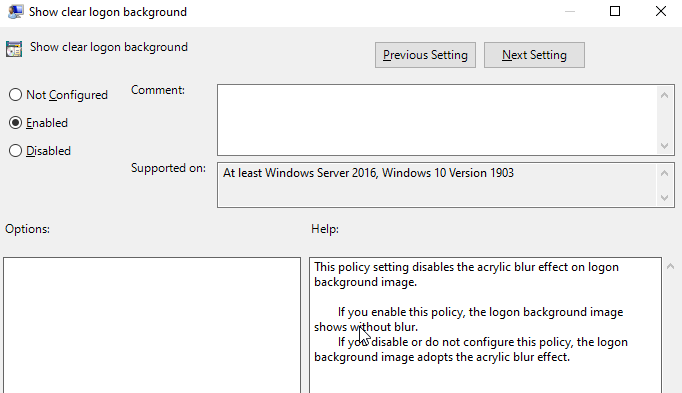
Enable the policy option: Show clear logon background
Restart the computer for good measure
Change using Registry setting:
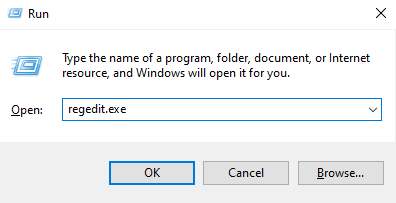
Launch the Registry editor (make sure you backup the registry prior to making any changes) > regedit.exe
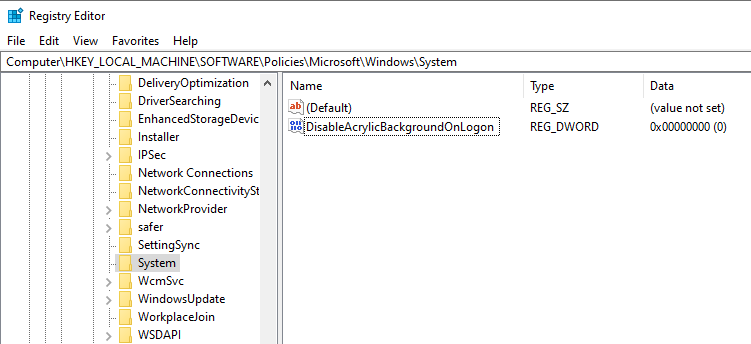
Go to: HKEY_LOCAL_MACHINE\SOFTWARE\Policies\Microsoft\Windows\System
Create a new DWORD (32-bit) value: DisableAcrylicBackgroundOnLogon
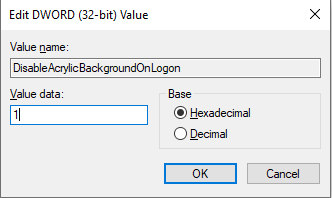
Set the Value data to 1 to disable the blur effect on the login screen
Restart the computer
Now, you should have a clear login screen background.
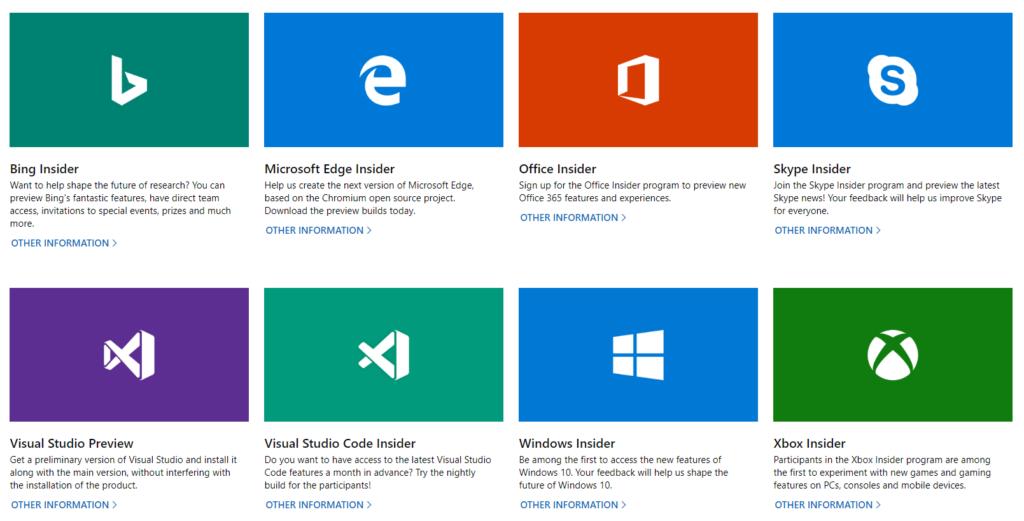
Microsoft provides several Insider programs which you can participate to get a preview of the latest features and updates, as well as provide feedback to Microsoft for bugs, issues, and request features.
In case you are trying to figure out what Insider programs are available and how you can sign up to participate, see below for the individual programs.
Microsoft has acknowledged an issue with PXE boot affecting Windows 8.1 and Windows Server 2012 R2 systems caused by a Security-Only update (KB4493467) released on April 9, 2019.
The Issue:
After installing this update, there may be issues using the Preboot Execution Environment (PXE) to start a device from a Windows Deployment Services (WDS) server configured to use Variable Window Extension. This may cause the connection to the WDS server to terminate prematurely while downloading the image. This issue does not affect clients or devices that are not using Variable Window Extension.
The Workaround:
To mitigate the issue, disable the Variable Window Extension on WDS server using one of the following options:
Option 1: Open an Administrator Command prompt and type the following:
Patch Management is an important role of a Sysadmin in the Enterprise, because securing endpoints with security updates to keep systems secure and functional, receive fixes that resolve issues, and patch security holes is highly important. However, with the frequency of security updates which are released these days, patch management tasks feels like a full-time job!
For the most part, monthly patches are straight forward, however in recent months, they have been problematic where they have caused system crashes, blue screens, application functionality issues, and introduced other bugs. Some faulty patches are quickly reversed or rectified by Microsoft, while others go unfixed for a longer duration causing further duress and downtime in many organizations. This has been a major pain point for Sysadmins in the field.
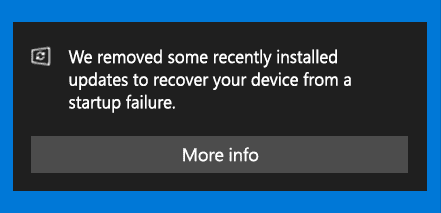
Well, we may have some reprieve from these buggy patches. Microsoft has announced that it will start uninstalling problematic patches automatically from Windows 10 systems when it detects a startup issue due to incompatibility or issues stemming from a recently installed patch. The following notification will be presented: “We removed some recently installed updates to recover your device from a startup failure.”
According to this KB4492307 posted by Microsoft, the problematic patch will not be reinstalled for 30 days to allow Microsoft and it’s partners to investigate and fix the issues. This process seems like a good proactive approach by Microsoft to get a handle of buggy patches, however more information is needed in terms of how this will work with detection, deployments, and compliance of these patches using ConfigMgr and WSUS as mechanisms for patch management in the enterprise. Time will tell, we hope!
This post is not to emphasize or promote the use of the local administrator account or provide such level of access to your users. IT Professionals and security experts will tell you that providing local administrator account privileges for end users is risky as it can introduce lots of issues such as ransomware attacks, malware infections, risk of compromised systems, and Pass-the-Hash attacks to name a few.
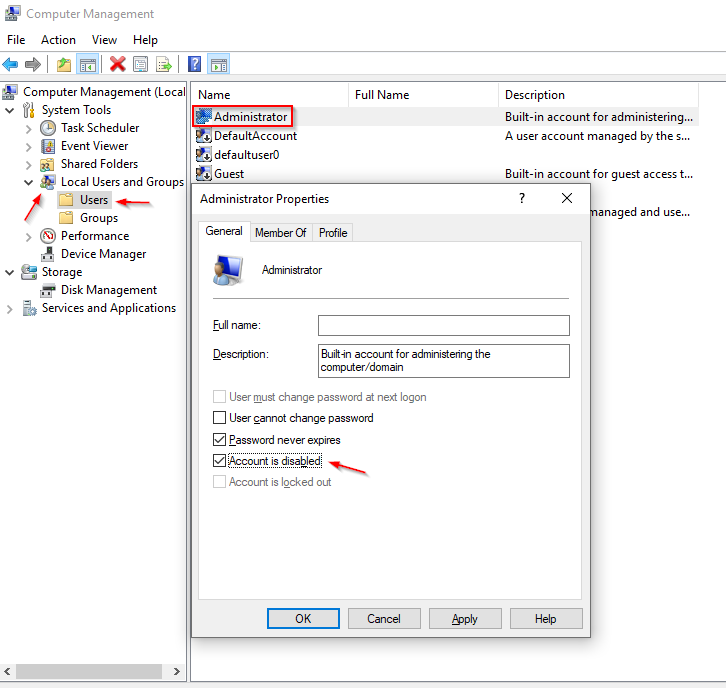
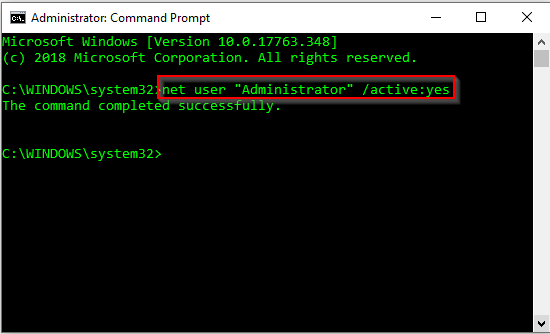
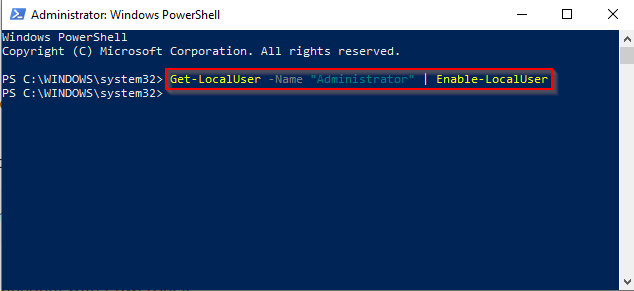
The local administrator account on a Windows 10 system is disabled by default. If you need to enable it for troubleshooting purposes or for some management tasks, you can do so in 3 ways.
Option 1: Computer Management
Click Start > search for Computer Management
Expand Local Users and Groups
Expand Users
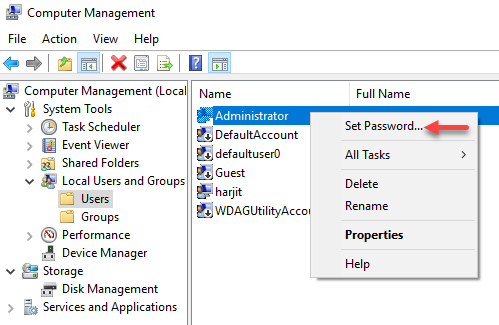
Right-click on Administrator account
Uncheck Account is disabled box > click Apply and OK
Used to monitor number of Google Analytics server requests when using Google Tag Manager
1 minute
_gid
ID used to identify users for 24 hours after last activity
24 hours
_ga_
ID used to identify users
2 years
_gali
Used by Google Analytics to determine which links on a page are being clicked
30 seconds
_ga
ID used to identify users
2 years
__utmx
Used to determine whether a user is included in an A / B or Multivariate test.
18 months
__utmv
Contains custom information set by the web developer via the _setCustomVar method in Google Analytics. This cookie is updated every time new data is sent to the Google Analytics server.
2 years after last activity
__utmz
Contains information about the traffic source or campaign that directed user to the website. The cookie is set when the GA.js javascript is loaded and updated when data is sent to the Google Anaytics server
6 months after last activity
__utmc
Used only with old Urchin versions of Google Analytics and not with GA.js. Was used to distinguish between new sessions and visits at the end of a session.
End of session (browser)
__utmb
Used to distinguish new sessions and visits. This cookie is set when the GA.js javascript library is loaded and there is no existing __utmb cookie. The cookie is updated every time data is sent to the Google Analytics server.
30 minutes after last activity
__utmt
Used to monitor number of Google Analytics server requests
10 minutes
__utma
ID used to identify users and sessions
2 years after last activity
_gac_
Contains information related to marketing campaigns of the user. These are shared with Google AdWords / Google Ads when the Google Ads and Google Analytics accounts are linked together.
90 days
Clarity is a web analytics service that tracks and reports website traffic.
Used to detect if the visitor has accepted the marketing category in the cookie banner. This cookie is necessary for GDPR-compliance of the website.
179 days
LOGIN_INFO
This cookie is used to play YouTube videos embedded on the website.
2 years
YSC
Registers a unique ID to keep statistics of what videos from YouTube the user has seen.
Session
PREF
This cookie stores your preferences and other information, in particular preferred language, how many search results you wish to be shown on your page, and whether or not you wish to have Google’s SafeSearch filter turned on.
10 years from set/ update
GPS
Registers a unique ID on mobile devices to enable tracking based on geographical GPS location.
1 day
VISITOR_INFO1_LIVE
Tries to estimate the users' bandwidth on pages with integrated YouTube videos. Also used for marketing