August 2026 Windows 11 Updates: KB5121003, KB5120240, Security Fixes, Improvements, and Known Issues

Microsoft has released the August 2026 Patch Tuesday updates for Windows 11, bringing another sizeable round of security fixes along with a surprisingly healthy list of quality improvements and new Windows features.

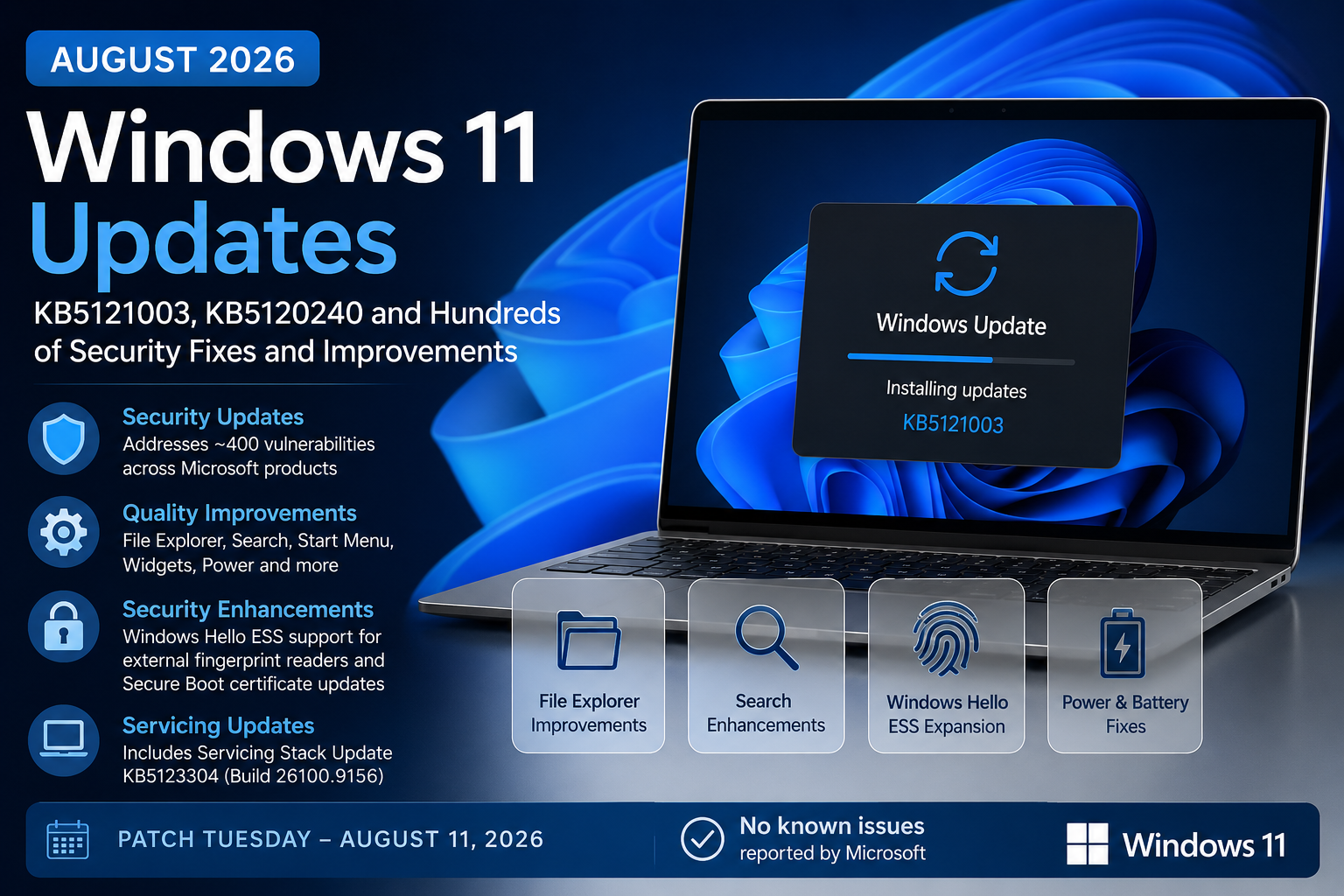
The main Windows 11 update this month is KB5121003 for Windows 11 versions 25H2 and 24H2. Windows 11 version 23H2 also receives KB5120240 for supported editions.

https://support.microsoft.com/en-us/servicing/os/windows-11/2026/08/kb5121003-windows-11-24h2-25h2-security-update

As usual for Patch Tuesday, these updates are cumulative and mandatory security updates. They include the latest vulnerability fixes plus improvements that Microsoft has been testing through previous optional preview releases.

And if July’s enormous Patch Tuesday was not enough excitement for Windows administrators, August is another busy month. BleepingComputer reports that Microsoft’s August security releases address roughly 400 vulnerabilities across Microsoft products, making patching something organizations should prioritize rather than leave sitting in a deployment ring for too long.

Let’s take a closer look at what is included.

August 2026 Windows 11 Update Overview

The August Patch Tuesday updates were released on August 11, 2026.

For Windows 11, the primary updates are:

Windows VersionKBOS Build
Windows 11 25H2KB512100326200.9168
Windows 11 24H2KB512100326100.9168
Windows 11 23H2KB5120240Supported 23H2 editions

KB5121003 applies to all editions of Windows 11 25H2 and 24H2. Microsoft combines the updates for these two versions because they share the same servicing foundation. As a result, the fixes are essentially the same across both releases.

Windows 11 23H2 continues to receive updates for supported Enterprise and Education editions. Home and Pro editions of Windows 11 23H2 have already reached end of support.

Security Updates and Vulnerabilities

Security is obviously the biggest reason to deploy the August updates.

According to reporting around the August 2026 Patch Tuesday release, Microsoft’s security updates address approximately 400 vulnerabilities across its product ecosystem. This number includes vulnerabilities beyond Windows itself, so administrators should review the Microsoft Security Update Guide for the products deployed in their environments rather than assuming all 400 apply to every Windows endpoint.

The Windows cumulative updates incorporate Microsoft’s latest operating system security protections covering components throughout the Windows platform.

As always, organizations should pay particular attention to vulnerabilities affecting areas such as:

  • Windows authentication and credential components
  • Windows kernel and kernel-mode drivers
  • Networking components
  • Windows graphics and user interface components
  • Remote access technologies
  • Windows storage and file system components
  • Secure Boot
  • Windows Update and servicing components

Microsoft’s Security Update Guide remains the best source for determining which CVEs apply to a specific operating system, server workload, Office product, or Microsoft application.

The important point for administrators is that these are Patch Tuesday security updates. Even if some of the user-facing improvements are not particularly important to your environment, the security fixes make the update itself important.

KB5121003 for Windows 11 25H2 and 24H2

Installing KB5121003 moves Windows 11 to:

Windows 11 25H2: OS Build 26200.9168

Windows 11 24H2: OS Build 26100.9168

Microsoft says the release also includes improvements from several previous updates, including the July 28 preview release KB5101684 and earlier July security and out-of-band releases.

That means organizations that skipped the optional July preview update still receive the fixes that eventually graduated into the August cumulative update.

This is one of the benefits of Windows cumulative servicing. You do not need to install every optional preview update along the way.

File Explorer Improvements

File Explorer receives several welcome quality-of-life improvements this month.

File sizes displayed in Details view can now use more appropriate units such as KB, MB, and GB instead of presenting everything primarily in kilobytes.

That sounds small, but it makes scanning folders with larger files much easier.

Microsoft is also expanding middle-click behavior in File Explorer. Users can middle-click a folder from locations such as the Address Bar or Home page to open the folder in a new tab.

Other File Explorer improvements include fixes for situations where the Home page could briefly flash gray during loading or unexpectedly scroll back to the top.

Microsoft has also improved thumbnail rendering for files appearing in the Recommended section of File Explorer Home.

None of these will transform how administrators manage Windows, but together they continue Microsoft’s gradual refinement of the modern File Explorer experience.

Windows Search Gets Better at Typos

Windows Search receives another usability improvement.

Search is becoming more forgiving when users mistype the name of an installed application or only remember part of the application name.

For example, users searching for an application with a minor spelling mistake should have a better chance of Windows finding what they actually intended.

Microsoft is also improving the ranking of Settings results so that more relevant configuration options appear higher in search results.

This is one of those changes that sounds minor until you support thousands of users who cannot remember exactly where Microsoft moved a particular Settings page.

Voice Access Improvements

Microsoft continues to invest heavily in Windows accessibility features.

Voice Access now gains Voice Isolation, which attempts to prioritize the user’s voice while filtering out other people speaking nearby and other background sounds.

Users can choose between multiple recognition modes:

  • Voice Isolation
  • Remove background noise only
  • No filtering

Voice Isolation requires a one-time voice setup.

Microsoft is also adding Korean language support for Voice Access and improving the reliability of Voice Access startup.

These are useful improvements for accessibility, shared workspaces, conference environments, and users who increasingly interact with their PCs through voice.

Windows Hello Enhanced Sign-In Security Expands

One of the more interesting security-related features arriving with this update is expanded support for Windows Hello Enhanced Sign-in Security, or ESS.

ESS can now support compatible external fingerprint sensors, rather than being limited mainly to fingerprint hardware integrated directly into a Windows device.

This could be particularly useful for desktop PCs, shared workstations, and other scenarios where an external biometric reader makes more sense than built-in hardware.

Users with supported hardware can configure the reader through:

Settings > Accounts > Sign-in options

Microsoft originally discussed this capability earlier in 2026, and the feature is now beginning to roll out more broadly.

For enterprise organizations investing in passwordless authentication, this is another small but meaningful expansion of the Windows Hello ecosystem.

Precision Touchpad Controls

Windows is also introducing additional controls for precision touchpads.

Users can configure options such as:

Scroll and zoom speed

This lets users adjust the baseline speed used when scrolling or zooming.

Accelerated scrolling

Repeated gestures can increase scrolling speed, making it quicker to navigate through long pages and documents.

Again, this is more of a user-experience improvement than an enterprise management change, but laptop-heavy organizations may appreciate the additional customization.

Start Menu Improvements

The Start menu continues to evolve.

Microsoft has improved the reliability of Start menu view preferences so that Windows is more likely to remember the layout or view previously selected by the user.

Keyboard navigation inside the Start menu application list has also been improved.

Microsoft is additionally refreshing the account control area of Start and may display subscription information for users signed into Windows with a Microsoft account.

For enterprise-managed devices, administrators will obviously want to evaluate consumer-oriented account experiences depending on how their Windows configuration policies are designed.

Widgets Changes

Widgets receive a couple of visual and behavioral changes.

Notification badges on the taskbar can now use the user’s Windows accent color instead of always appearing red.

Microsoft is also simplifying the default Lock screen widget experience. New users will initially see Weather as the primary Lock screen widget rather than a larger collection of widgets.

Organizations managing Lock screen experiences through policy may not see much impact here, but it is another reminder that Microsoft’s continuous innovation model means parts of the Windows interface can continue evolving between annual feature releases.

Accessibility Improvements

The Windows Magnifier experience is changing on touch-enabled devices.

Horizontal and vertical touch bars used for navigating the magnified screen will now be disabled by default so they do not cover content.

Users who rely on the touch controls can enable them again through:

Settings > Accessibility > Magnifier

Microsoft is also improving mouse cursor size persistence so that customized cursor sizing is more reliably retained.

Power and Battery Fixes

The August update includes several useful fixes related to power configuration.

Changes made through Windows Settings should now apply more consistently across power plans.

This includes settings related to:

  • Display timeout
  • Sleep
  • Hibernate
  • Power button
  • Sleep button
  • Laptop lid close behavior

Microsoft is also restoring the ability to configure the battery percentage threshold at which Energy Saver automatically activates.

For administrators, power-management consistency is important because inconsistent settings can affect both user experience and device battery longevity.

Windows Update Improvements

Yes, Windows Update itself gets updated by Windows Update.

Microsoft is improving how installation progress is calculated and presented within the Windows Update Settings interface.

Update cleanup logic is also being improved to help system performance shortly after an update has completed.

This may help reduce some of the background cleanup activity users sometimes notice after a cumulative update installs.

Date, Time, and Daylight Saving Time Updates

The update includes improvements for detecting when Windows should display a time-zone-change notification.

Microsoft is also updating daylight saving time information for several regions, including:

  • Beirut
  • Casablanca
  • Jerusalem
  • Nuuk

These types of changes are easy to overlook, but incorrect time-zone information can create problems with calendaring, authentication, logging, automation, and scheduled tasks.

AI Component Changes

On supported Copilot+ PCs, Microsoft is making it possible to remove the Image Generation AI component if it is installed.

KB5121003 also updates several Windows AI components.

Microsoft lists updated versions of:

  • Image Search
  • Content Extraction
  • Semantic Analysis
  • Settings Model

These components move to version 1.2605.856.0 with the August release.

These AI component updates only apply where the appropriate Copilot+ PC hardware and Windows capabilities exist.

They do not suddenly install AI functionality on every Windows PC or Windows Server.

Servicing Stack Update KB5123304

KB5121003 also includes a servicing stack update.

The included SSU is:

KB5123304

Build 26100.9156

Servicing Stack Updates improve the underlying components Windows uses to install and maintain updates.

Microsoft now combines SSUs with cumulative updates in most servicing scenarios, which means administrators generally do not have to deploy a separate SSU first.

Secure Boot Certificate Updates Continue

This is one area enterprise administrators should continue watching closely.

Microsoft has been transitioning Windows devices to newer Secure Boot certificates because certificates used by many existing systems began reaching expiration periods starting in 2026.

The August update includes additional targeting data designed to increase the number of eligible devices that automatically receive updated Secure Boot certificates.

Microsoft says certificate deployment will continue across supported PCs and non-managed business devices through Windows Update.

For enterprise environments, I would not treat this as something that can simply be forgotten because Windows Update will eventually handle it.

Administrators should continue validating Secure Boot readiness, firmware compatibility, recovery processes, and deployment behavior across representative hardware models.

Secure Boot sits very early in the startup trust chain, so this is one area where testing matters.

Important Deployment Note for Updated Installation Media

Microsoft also calls out an important consideration for administrators servicing Windows installation media.

If you are applying Dynamic Updates to an existing Windows image, the installation media needs to contain the correct boot.stl file.

Microsoft warns that missing or mismatched boot.stl content could prevent the device from successfully booting from updated installation media and may result in error:

0xc0430001

Microsoft recommends using its Update WinPE process when servicing existing Windows images.

The boot.stl file participates in Secure Boot validation and must match the Windows version and architecture being deployed.

This is particularly relevant for organizations maintaining custom operating system images, deployment media, Configuration Manager task sequences, or other traditional imaging workflows.

Windows 11 24H2 Home and Pro End of Support Is Approaching

Another important reminder buried inside Microsoft’s release notes is the Windows 11 24H2 support timeline.

Windows 11 24H2 Home and Pro reach end of servicing on October 13, 2026.

That date is now very close.

Devices running these editions will stop receiving monthly quality and security updates after support ends.

Windows 11 24H2 Enterprise and Education remain supported longer, through October 12, 2027.

For organizations still running 24H2 broadly, now is a good time to validate the transition to Windows 11 25H2 rather than waiting until October.

Windows 11 23H2 and KB5120240

Windows 11 23H2 also receives the August security update through KB5120240.

At this point in the Windows 11 lifecycle, 23H2 should mainly be relevant to supported Enterprise and Education deployments.

Windows 11 23H2 Home and Pro reached end of servicing in November 2025, while Enterprise and Education editions remain supported through November 10, 2026.

That means organizations still running Windows 11 23H2 Enterprise or Education have only a few months remaining before they too need to move forward.

If 23H2 devices are still sitting in production because of application compatibility, hardware qualification, or deployment delays, August is a good month to start treating that migration as a priority.

Known Issues

Here is the good news.

Microsoft currently states that it is not aware of any known issues with KB5121003.

Independent reporting around the August Patch Tuesday release also indicates that Microsoft had not identified any new widespread issues at launch.

Of course, that does not mean problems cannot appear later.

We have seen many Windows updates launch with a clean known-issues list only for compatibility problems to surface after deployment reaches millions of additional devices.

Organizations should still use deployment rings and staged validation.

How I Would Approach Deployment

For managed environments, I would recommend following the usual deployment-ring strategy.

Start with IT and dedicated test devices.

Then move into an early-adopter or pilot group representing different hardware models, departments, locations, and important business applications.

Monitor areas such as:

  • Boot behavior
  • BitLocker recovery events
  • VPN connectivity
  • Authentication
  • Windows Hello
  • Printing
  • Security software
  • Endpoint management agents
  • Business-critical applications
  • File Explorer behavior
  • Power management
  • Update installation failures

Assuming testing remains clean, continue expanding deployment until the update reaches the broader production environment.

Security updates are becoming increasingly important to deploy quickly, but quickly does not have to mean blindly.

Modern patch management should balance speed, risk, telemetry, and controlled rollout.

Intune and Windows Autopatch Considerations

Organizations managing Windows through Microsoft Intune can deploy the August update through Windows Update for Business policies, update rings, feature update policies, or Windows Autopatch depending on their configuration.

Microsoft confirms KB5121003 is available through Windows Update for Business and follows the update policies configured for managed devices.

For organizations using Windows Autopatch, this is where Microsoft’s staged deployment model becomes valuable.

Rather than releasing the update to every device simultaneously, administrators can use managed deployment rings to observe reliability before wider rollout.

Organizations using hotpatch on eligible devices should also review whether the August security cycle applies through hotpatch or requires a baseline cumulative update based on Microsoft’s servicing schedule and device eligibility.

Final Thoughts

The August 2026 Windows 11 update is another substantial servicing release.

Security is obviously the headline, with Microsoft’s August Patch Tuesday addressing hundreds of vulnerabilities across its product portfolio.

But KB5121003 is not just a security update.

There are useful improvements scattered throughout Windows, including better File Explorer behavior, improved Windows Search, additional Voice Access capabilities, external fingerprint reader support with Windows Hello ESS, improved power settings, accessibility enhancements, and continued refinement of Windows Update itself.

For enterprise administrators, however, the two things I would pay extra attention to this month are Secure Boot certificate readiness and Windows version lifecycle planning.

Windows 11 24H2 Home and Pro reach end of servicing in October, while Windows 11 23H2 Enterprise and Education are approaching their own end-of-support date in November.

There is never really a quiet month in Windows servicing anymore.

Test the update, monitor your deployment rings, review the security vulnerabilities that apply to your environment, and get those devices patched.

Windows 11 July 2026 Patch Tuesday: Security Fixes, Quality Improvements, and What IT Admins Need to Know

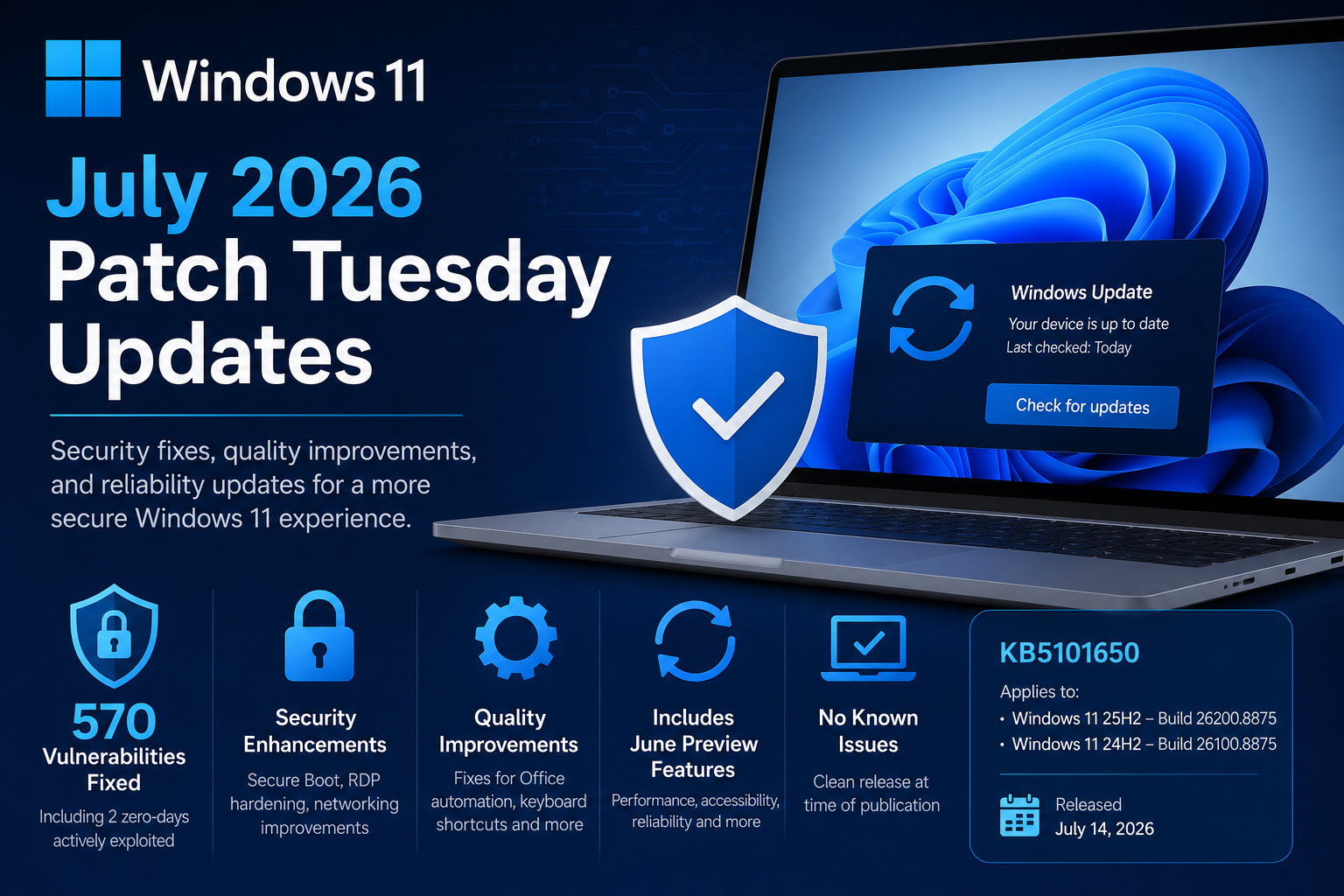
Microsoft has released its July 2026 Patch Tuesday updates for Windows 11, delivering another important month of security and reliability improvements. While this month’s release does not introduce a long list of new end-user features, it is one of the most significant security releases in recent memory, addressing hundreds of vulnerabilities across the Windows ecosystem while also rolling in the non-security improvements that first appeared in the June preview update.

https://support.microsoft.com/en-US/servicing/os/windows-11/2026/07/july-14-2026-kb5101650-os-builds-26200-8875-and-26100-8875

For organizations and IT administrators, this is a mandatory security update that should be prioritized through your normal deployment and testing process.

Windows 11 July 2026 Updates at a Glance

Windows VersionKBOS Build
Windows 11 25H2KB5101650Build 26200.8875
Windows 11 24H2KB5101650Build 26100.8875

As with previous cumulative updates, if your device is already current, Windows will only download the new fixes that were not previously installed. This month’s release also includes all of the improvements delivered in the June 2026 preview update (KB5095093), meaning organizations that skipped the optional preview will receive those enhancements automatically.

A Record-Breaking Security Release

The headline for July’s Patch Tuesday is security.

Microsoft addressed approximately 570 security vulnerabilities across Windows and its supported products, making this one of the largest Patch Tuesday releases the company has ever published. Among those fixes are:

  • Two zero-day vulnerabilities that were actively exploited
  • One publicly disclosed vulnerability
  • Fifty-nine Critical vulnerabilities
  • Hundreds of Elevation of Privilege, Remote Code Execution, Information Disclosure, Denial of Service, and Spoofing vulnerabilities

The largest categories include:

  • 254 Elevation of Privilege vulnerabilities
  • 145 Remote Code Execution vulnerabilities
  • 102 Information Disclosure vulnerabilities
  • 35 Denial of Service vulnerabilities
  • 17 Security Feature Bypass vulnerabilities
  • 16 Spoofing vulnerabilities

This month’s release reinforces why delaying Patch Tuesday deployments can significantly increase organizational risk, especially when active exploitation is already occurring.

Security Improvements Included in KB5101650

Beyond vulnerability fixes, Microsoft continues strengthening several core Windows security technologies.

Expanded Secure Boot Certificate Deployment

Microsoft continues rolling out updated Secure Boot certificates to eligible Windows devices.

These certificates became increasingly important after older Secure Boot certificates began approaching expiration during 2026. This update expands Microsoft’s targeting logic so more eligible systems automatically receive the new certificates through Windows Update.

For most users, this happens entirely in the background, but for enterprise administrators it helps ensure devices remain trusted and boot securely as certificate transitions continue.

curl Updated

Windows now ships with curl 8.21.0, bringing newer security fixes and improvements for one of the most commonly used networking utilities included with Windows.

This benefits administrators, developers, automation scripts, and troubleshooting scenarios that rely on curl.

Remote Desktop Security Improvements

Microsoft is continuing its effort to modernize Remote Desktop security.

This update adds support for SHA-2 certificate thumbprints for trusted Remote Desktop publishers while retaining SHA-1 only for backward compatibility. Microsoft recommends administrators begin migrating to SHA-256 or stronger algorithms to prepare for future removal of SHA-1 support.

The update also introduces new guidance for controlling which RDP files users can open, helping reduce phishing risks associated with malicious Remote Desktop configuration files.

Networking Security Hardening

A new networking hardening change now enforces Transport Driver Interface (TDI) transport registration requirements.

While this improves Windows security, organizations using older third-party networking components should validate compatibility before broad deployment, as applications relying on unregistered third-party TDI transports may stop functioning after the update.

Quality Improvements and Bug Fixes

Although this is primarily a security release, Microsoft also includes the quality improvements introduced in the June preview update.

Office Automation Compatibility Fix

One particularly welcome fix addresses an issue introduced after the June 2026 security update.

Some third-party applications that automate Microsoft Office through OLE Automation could fail to launch Office applications or open documents correctly.

That issue has now been resolved, which will be especially important for organizations that depend on custom business applications and Office integrations.

Keyboard Shortcut Reliability

Microsoft adjusted how Windows manages hotkey registration and cleanup.

In rare situations, some built-in Windows experiences may temporarily stop responding to keyboard shortcuts because of the new lifecycle behavior. Restarting the affected application generally resolves the issue.

If problems persist, Microsoft recommends reporting them through the Feedback Hub.

Features Included from the June Preview Release

Because July’s cumulative update incorporates June’s optional preview update, organizations that skipped the preview will now receive several new capabilities, including:

  • Point-in-Time Restore for Windows
  • Improved Bluetooth reliability and pairing
  • Performance improvements throughout File Explorer
  • Accessibility enhancements
  • Widgets experience improvements with fewer distractions
  • Additional recovery enhancements

These are now part of the standard supported Windows experience without requiring administrators to install the optional preview release separately.

AI Component Updates

For Windows Copilot+ PCs, Microsoft also updates several AI components to version 1.2605.856.0, including:

  • Image Search
  • Content Extraction
  • Semantic Analysis
  • Settings Model

These updates only apply to supported Copilot+ devices and are not installed on standard Windows PCs.

Servicing Stack Update

KB5101650 also includes a Servicing Stack Update (SSU), improving the reliability of future Windows Update installations.

Microsoft now packages Servicing Stack Updates together with cumulative updates, simplifying deployment and reducing administrative overhead.

Known Issues

The good news this month is simple.

Microsoft currently reports no known issues with KB5101650 at the time of release.

That does not necessarily mean issues will not surface as organizations begin broader deployments, but it is encouraging to see a clean release from Microsoft’s Release Health dashboard.

Important Lifecycle Reminder

Microsoft also reminds customers that:

  • Windows 11 version 24H2 Home and Pro editions reach end of servicing on October 13, 2026
  • Enterprise and Education editions remain supported until October 12, 2027

Organizations still running Home or Pro editions of 24H2 should begin planning upgrades to newer supported Windows releases to continue receiving monthly security updates.

Deployment Recommendations for IT Admins

As with every Patch Tuesday, production deployment should follow your organization’s normal validation process.

Recommended approach:

  • Test on pilot devices first.
  • Validate line-of-business applications, particularly those using Microsoft Office automation.
  • Verify networking applications if your environment uses third-party networking drivers or legacy transports.
  • Confirm Remote Desktop workflows continue operating as expected.
  • Roll out broadly after successful validation.

Since this month’s release contains active zero-day fixes, organizations should avoid delaying deployment longer than necessary.

Final Thoughts

July 2026 may not be remembered for flashy new Windows features, but it is an extremely important release from a security perspective. With roughly 570 vulnerabilities addressed, including actively exploited zero-days, this month’s cumulative update is one that deserves immediate attention from both consumers and enterprise IT teams.

In addition to strengthening Windows security, Microsoft continues improving platform reliability with Secure Boot certificate updates, Remote Desktop security enhancements, Office compatibility fixes, networking hardening, and the quality improvements carried forward from June’s preview release.

For most organizations, KB5101650 is a straightforward deployment that enhances security while delivering a more stable Windows 11 experience with no currently known issues reported by Microsoft.

February 2021 – Microsoft Patch Tuesday and Other Patches

Microsoft has released fixes for 56 vulnerabilities, with 11 updates classified as Critical and 43 as Important. Here’s an updated announcement (2021-02-09) from Microsoft: Deploy Windows SSUs and LCUs together with one cumulative update –

Beginning with the February 2021 LCU, we will now publish all future cumulative updates and SSUs for Windows 10, version 2004 and above together as one cumulative monthly update to the normal release category in WSUS.

LCU = Latest Cummulative Update
SSU – Servicing Stack Update

UPDATE – 2021-02-21
KB4301818 > KB5001078

UPDATE – 2021-02-17
KB4577586

Windows 10 Updates for February 2021:

  • KB4601319 (OS Builds 19041.804 and 19042.804) for Windows 10 version 20H2 / 2004
  • KB4601315 (OS Build 18363.1377) for Windows 10, version 1909
  • KB5001028 (OS Build 18363.1379) Out-of-band for Windows 10, version 1909
  • KB4601345 (OS Build 17763.1757) for Windows 10 version 1809
  • KB4601354 (OS Build 17134.2026) for Windows 10 version 1803
  • KB4601330 (OS Build 15063.2642) for Windows 10 version 1703
  • KB4601318 (OS Build 14393.4225) for Windows 10 version 1607
  • KB4601331 (OS Build 10240.18842) for Windows 10, initial release

Additional February 2021 Patching Resources:

Patched publicly disclosed vulnerabilities:

  • CVE-2021-1721 – .NET Core and Visual Studio Denial of Service Vulnerability
  • CVE-2021-1727 – Windows Installer Elevation of Privilege Vulnerability
  • CVE-2021-1733 – Sysinternals PsExec Elevation of Privilege Vulnerability
  • CVE-2021-24098 – Windows Console Driver Denial of Service Vulnerability
  • CVE-2021-24106 – Windows DirectX Information Disclosure Vulnerability
  • CVE-2021-26701 – .NET Core Remote Code Execution Vulnerability

Intel microcode updates for Windows:

Microsoft has also released Intel microcode updates for Windows 10 20H2, 2004, 1909, and older versions to fix issues impacting current and previously released Windows 10 versions.

These microcode updates are offered to affected devices via Windows Update but they can also be manually downloaded directly from the Microsoft Catalog using these links:

  • KB4589212: Intel microcode updates for Windows 10, version 2004 and 20H2, and Windows Server, version 2004 and 20H2
  • KB4589211: Intel microcode updates for Windows 10, version 1903 and 1909, and Windows Server, version 1903 and 1909
  • KB4589208: Intel microcode updates for Windows 10, version 1809 and Windows Server 2019
  • KB4589206: Intel microcode updates for Windows 10, version 1803
  • KB4589210: Intel microcode updates for Windows 10, version 1607 and Windows Server 2016
  • KB4589198: Intel microcode updates for Windows 10, version 1507

On February 9, 2021, Microsoft released security updates affecting the following Microsoft products:

Product FamilyMaximum SeverityMaximum ImpactAssociated KB Articles and/or Support Webpages
Windows 10 v20H2, v2004, v1909, v1809, and v1803CriticalRemote Code ExecutionWindows 10 v2004 and Windows 10 v20H2: 4601319 Windows 10 v1909: 4601315 Windows 10 v1809: 4601345 Windows 10 v1803: 4601354
Windows Server 2019, Windows Server 2016, and Server Core installations (2019, 2016, v20H2, v2004, and v1909)CriticalRemote Code ExecutionWindows Server 2019: 4601345 Windows Server 2016: 4601318 Windows Server v2004 and Windows Server v20H2: 4601319 Windows Server v1909: 4601315
Windows 8.1, Windows Server 2012 R2, and Windows Server 2012CriticalRemote Code ExecutionWindows 8.1 and Windows Server 2012 R2 Monthly Rollup: 4601384 Windows 8.1 and Windows Server 2012 R2 Security Only: 4601349 Windows Server 2012 Monthly Rollup: 4601348 Windows Server 2012 Security Only: 4601357
Microsoft Office-related softwareImportantRemote Code Execution4493211, 4493222, 4493196, 4493192, 4493204
Microsoft SharePoint-related softwareImportantRemote Code Execution4493210, 4493194, 4493195, 4493223
Microsoft Lync/Skype for BusinessImportantDenial of Service5000675, 5000688
Microsoft Exchange ServerImportantSpoofing4602269, 4571787
Microsoft .NET-related softwareCriticalRemote Code Execution4601318, 4601050, 4601887, 4603004, 4602960, 4603005, 4602961, 4601354, 4601056, 4603003, 4602959, 4603002, 4602958, 4601051, 4601054
Microsoft Visual StudioImportantRemote Code ExecutionFind details on security updates for Visual Studio-related software in the Security Update Guide: https://msrc.microsoft.com/update-guide
Microsoft Dynamics-related softwareImportantInformation Disclosure4602915
Microsoft Azure-related softwareImportantElevation of PrivilegeFind details on security updates for Azure-related software in the Security Update Guide: https://msrc.microsoft.com/update-guide
Developer toolsImportantRemote Code ExecutionFind details on security updates for developer tools in the Security Update Guide: https://msrc.microsoft.com/update-guide

Notes:

Security vulnerability overview:

Below is a summary showing the number of vulnerabilities addressed in this release, broken down by product/component and by impact.

Vulnerability DetailsRCEEOPIDSFBDOSSPFTMPPublicly DisclosedKnown ExploitMax CVSS
Windows 10 v20H2 & Windows Server v20H210752400319.8
Windows 10 v2004 & Windows Server v200410752400319.8
Windows 10 v1909 & Windows Server v190910652300319.8
Windows 10 v1809 & Windows Server 201910752300319.8
Windows 10 v18037642300319.8
Windows Server 201610531200109.8
Windows 8.1 & Server 2012 R27430200109.8
Windows Server 20127430200109.8
Microsoft Office-related software4000000007.8
Microsoft SharePoint-related software2010010008.8
Lync/Skype for Business0000110006.5
Microsoft Exchange Server0000020006.5
Microsoft .NET-related software2000200008.1
Microsoft Visual Studio-related software2000100107.8
Microsoft Dynamics-related software0010010006.5
Microsoft Azure-related software0200000007.0
Developer tools1100000007.8
RCE = Remote Code Execution | EOP = Elevation of Privilege | ID = Information Disclosure | SFB = Security Feature Bypass | DOS = Denial of Service | SPF = Spoofing | TMP = Tampering

Resources for deploying updates to remote devices:

Part 1: Helping businesses rapidly set up to work securely from personal PCs and mobiles
Part 2: Helping IT send and provision business PCs at home to work securely during COVID-19
Part 3: Manage work devices at home during Covid-19 using Configuration Manager
Part 4: Managing remote machines with cloud management gateway (CMG)
Part 5: Managing Patch Tuesday with Configuration Manager in a remote work world

See also:
Mastering​ Configuration Manager Bandwidth limitations for VPN connected Clients

Vulnerability details for the current month:

Below are summaries for some of the security vulnerabilities in this release:

Attack VectorThis metric reflects the context by which vulnerability exploitation is possible. The Base Score increases the more remote (logically, and physically) an attacker can be in order to exploit the vulnerable component.
Attack ComplexityThis metric describes the conditions beyond the attacker’s control that must exist in order to exploit the vulnerability. Such conditions may require the collection of more information about the target or computational exceptions. The assessment of this metric excludes any requirements for user interaction in order to exploit the vulnerability. If a specific configuration is required for an attack to succeed, the Base metrics should be scored assuming the vulnerable component is in that configuration.
Privileges RequiredThis metric describes the level of privileges an attacker must possess before successfully exploiting the vulnerability.
User InteractionThis metric captures the requirement for a user, other than the attacker, to participate in the successful compromise the vulnerable component. This metric determines whether the vulnerability can be exploited solely at the will of the attacker, or whether a separate user (or user-initiated process) must participate in some manner.
CVE-2021-1727Windows Installer Elevation of Privilege Vulnerability
ImpactElevation of Privilege
SeverityImportant
Publicly Disclosed?Yes
Known Exploits?No
ExploitabilityExploitation more likely
CVSS Base Score7.8
Attack VectorLocal
Attack ComplexityLow
Privileges RequiredLow
User InteractionNone
ScopeUnchanged
ConfidentialityHigh
IntegrityHigh
AvailabilityHigh
Affected SoftwareAll supported versions of Windows
More Informationhttps://msrc.microsoft.com/update-guide/vulnerability/CVE-2021-1727
CVE-2021-1732Windows Win32k Elevation of Privilege Vulnerability
ImpactElevation of Privilege
SeverityImportant
Publicly Disclosed?No
Known Exploits?Yes
ExploitabilityExploitation detected
CVSS Base Score7.8
Attack VectorLocal
Attack ComplexityLow
Privileges RequiredLow
User InteractionNone
ScopeUnchanged
ConfidentialityHigh
IntegrityHigh
AvailabilityHigh
Affected SoftwareWindows 10 v20H2, Windows 10 v2004, Windows 10 v1909, Windows 10 v1809, Windows 10 v1803, Windows Server v20H2, Windows Server v2004, Windows Server v1909, and Windows Server 2019
More Informationhttps://msrc.microsoft.com/update-guide/vulnerability/CVE-2021-1732
CVE-2021-24074Windows TCP/IP Remote Code Execution Vulnerability
ImpactRemote Code Execution
SeverityCritical
Publicly Disclosed?No
Known Exploits?No
ExploitabilityExploitation more likely
CVSS Base Score9.8
Attack VectorNetwork
Attack ComplexityLow
Privileges RequiredNone
User InteractionNone
ScopeUnchanged
ConfidentialityHigh
IntegrityHigh
AvailabilityHigh
Affected SoftwareAll supported versions of Windows
More Informationhttps://msrc.microsoft.com/update-guide/vulnerability/CVE-2021-24074
CVE-2021-24094Windows TCP/IP Remote Code Execution Vulnerability
ImpactRemote Code Execution
SeverityCritical
Publicly Disclosed?No
Known Exploits?No
ExploitabilityExploitation more likely
CVSS Base Score9.8
Attack VectorNetwork
Attack ComplexityLow
Privileges RequiredNone
User InteractionNone
ScopeUnchanged
ConfidentialityHigh
IntegrityHigh
AvailabilityHigh
Affected SoftwareAll supported versions of Windows
More Informationhttps://msrc.microsoft.com/update-guide/vulnerability/CVE-2021-24094
CVE-2021- 24077Windows Fax Service Remote Code Execution Vulnerability
ImpactRemote Code Execution
SeverityCritical
Publicly Disclosed?No
Known Exploits?No
ExploitabilityExploitation less likely
CVSS Base Score9.8
Attack VectorNetwork
Attack ComplexityLow
Privileges RequiredNone
User InteractionNone
ScopeUnchanged
ConfidentialityHigh
IntegrityHigh
AvailabilityHigh
Affected SoftwareAll supported versions of Windows
More Informationhttps://msrc.microsoft.com/update-guide/vulnerability/CVE-2021-24077
CVE-2021-24078Windows DNS Server Remote Code Execution Vulnerability
ImpactRemote Code Execution
SeverityCritical
Publicly Disclosed?No
Known Exploits?No
ExploitabilityExploitation more likely
CVSS Base Score9.8
Attack VectorNetwork
Attack ComplexityLow
Privileges RequiredNone
User InteractionNone
ScopeUnchanged
ConfidentialityHigh
IntegrityHigh
AvailabilityHigh
Affected SoftwareWindows Server v20H2, Windows Server v2004, Windows Server v1909, Windows Server 2019, Windows Server 2016, Windows Server 2012 R2, and Windows Server 2012
More Informationhttps://msrc.microsoft.com/update-guide/vulnerability/CVE-2021-24078
CVE-2021-24088Windows Local Spooler Remote Code Execution Vulnerability
ImpactRemote Code Execution
SeverityCritical
Publicly Disclosed?No
Known Exploits?No
ExploitabilityExploitation less likely
CVSS Base Score8.8
Attack VectorNetwork
Attack ComplexityLow
Privileges RequiredLow
User InteractionNone
ScopeUnchanged
ConfidentialityHigh
IntegrityHigh
AvailabilityHigh
Affected SoftwareAll supported versions of Windows
More Informationhttps://msrc.microsoft.com/update-guide/vulnerability/CVE-2021-24088
CVE-2021-24098Windows Console Driver Denial of Service Vulnerability
ImpactDenial of Service
SeverityImportant
Publicly Disclosed?Yes
Known Exploits?No
ExploitabilityExploitation less likely
CVSS Base Score5.5
Attack VectorLocal
Attack ComplexityLow
Privileges RequiredNone
User InteractionRequired
ScopeUnchanged
ConfidentialityNone
IntegrityNone
AvailabilityHigh
Affected SoftwareWindows 10 v20H2, Windows 10 v2004, Windows 10 v1909, Windows 10 v1809, Windows 10 v1803, Windows Server v20H2, Windows Server v2004, Windows Server v1909, and Windows Server 2019
More Informationhttps://msrc.microsoft.com/update-guide/vulnerability/CVE-2021-24098
CVE-2021-24066Microsoft SharePoint Remote Code Execution Vulnerability
ImpactRemote Code Execution
SeverityImportant
Publicly Disclosed?No
Known Exploits?No
ExploitabilityExploitation more likely
CVSS Base Score8.8
Attack VectorNetwork
Attack ComplexityLow
Privileges RequiredLow
User InteractionNone
ScopeUnchanged
ConfidentialityHigh
IntegrityHigh
AvailabilityHigh
Affected SoftwareMicrosoft SharePoint Server 2019, Microsoft SharePoint Enterprise Server 2016, Microsoft SharePoint Foundation 2013 Service Pack 1, and Microsoft SharePoint Foundation 2010 Service Pack 2
More Informationhttps://msrc.microsoft.com/update-guide/vulnerability/CVE-2021-24066
CVE-2021-24067Microsoft Excel Remote Code Execution Vulnerability
ImpactRemote Code Execution
SeverityImportant
Publicly Disclosed?No
Known Exploits?No
ExploitabilityExploitation less likely
CVSS Base Score7.8
Attack VectorLocal
Attack ComplexityLow
Privileges RequiredNone
User InteractionRequired
ScopeUnchanged
ConfidentialityHigh
IntegrityHigh
AvailabilityHigh
Affected SoftwareMicrosoft 365 Apps for Enterprise, Excel 2016, Excel 2013, Excel 2010, Office Online Server, Office 2019, Office 2019 for Mac, and Office Web Apps Server 2013
More Informationhttps://msrc.microsoft.com/update-guide/vulnerability/CVE-2021-24067 

February 2021 Microsoft Office security updates

Microsoft Office security updates are delivered through the Microsoft Update platform and via the Download Center.

Patched Office security vulnerabilities – (Source: Bleeping Computer)

This month’s Office security updates address bugs exposing Windows systems running vulnerable Click to Run and Microsoft Installer (.msi) based editions of Microsoft Office products to remote code execution (RCE), information disclosure, and spoofing attacks.

Microsoft rated the six RCE bugs patched in February 2021 as Important severity issues given that they could enable attackers to execute arbitrary code in the context of the currently logged-in user.

Following successful exploitation, attackers could install malicious programs, view, change, and delete data, as well as make their own admin accounts on exploited Windows devices.

TagCVE IDCVE TitleSeverity
Microsoft Office ExcelCVE-2021-24067Microsoft Excel Remote Code Execution VulnerabilityImportant
Microsoft Office ExcelCVE-2021-24068Microsoft Excel Remote Code Execution VulnerabilityImportant
Microsoft Office ExcelCVE-2021-24069Microsoft Excel Remote Code Execution VulnerabilityImportant
Microsoft Office ExcelCVE-2021-24070Microsoft Excel Remote Code Execution VulnerabilityImportant
Microsoft Office SharePointCVE-2021-24071Microsoft SharePoint Information Disclosure VulnerabilityImportant
Microsoft Office SharePointCVE-2021-1726Microsoft SharePoint Spoofing VulnerabilityImportant
Microsoft Office SharePointCVE-2021-24066Microsoft SharePoint Remote Code Execution VulnerabilityImportant
Microsoft Office SharePointCVE-2021-24072Microsoft SharePoint Server Remote Code Execution VulnerabilityImportant

Further information about each of them is available within the knowledge base articles linked below.

Microsoft Office 2016:

ProductKnowledge Base article title and number
Excel 2016Description of the security update for Excel 2016: February 9, 2021 (KB4493196)
Office 2016February 2, 2021, update for Office 2016 (KB4493189)
Outlook 2016February 2, 2021, update for Outlook 2016 (KB4493190)
PowerPoint 2016February 2, 2021, update for PowerPoint 2016 (KB4493164)

Microsoft Office 2013:

ProductKnowledge Base article title and number
Excel 2013Description of the security update for Excel 2013: February 9, 2021 (KB4493211)
Office 2013February 2, 2021, update for Office 2013 (KB4486684)
PowerPoint 2013February 2, 2021, update for PowerPoint 2013 (KB4493169)

Microsoft Office 2010:

ProductKnowledge Base article title and number
Excel 2010Description of the security update for Excel 2010: February 9, 2021 (KB4493222)
Office 2010February 2, 2021, update for Office 2010 (KB4493180)
PowerPoint 2010February 2, 2021, update for PowerPoint 2010 (KB4493179)

Microsoft SharePoint Server 2019:

ProductKnowledge Base article title and number
Office Online ServerDescription of the security update for Office Online Server: February 9, 2021 (KB4493192)
SharePoint Server 2019Description of the security update for SharePoint Server 2019: February 9, 2021 (KB4493194)
SharePoint Server 2019 Language PackFebruary 9, 2021, update for SharePoint Server 2019 Language Pack (KB4493193)

Microsoft SharePoint Server 2016:

ProductKnowledge Base article title and number
SharePoint Enterprise Server 2016Description of the security update for SharePoint Enterprise Server 2016: February 9, 2021 (KB4493195)

Microsoft SharePoint Server 2013:

ProductKnowledge Base article title and number
Office Web Apps Server 2013Description of the security update for Office Web Apps Server 2013: February 9, 2021 (KB4493204)
Project Server 2013February 9, 2021, cumulative update for Project Server 2013 (KB4493207)
SharePoint Enterprise Server 2013February 9, 2021, cumulative update for SharePoint Enterprise Server 2013 (KB4493209)
SharePoint Foundation 2013Description of the security update for SharePoint Foundation 2013: February 9, 2021 (KB4493210)
SharePoint Foundation 2013February 9, 2021, cumulative update for SharePoint Foundation 2013 (KB4493205)

Microsoft SharePoint Server 2010:

ProductKnowledge Base article title and number
Project Server 2010February 9, 2021, update for Project Server 2010 (KB4475537)
Project Server 2010February 9, 2021, cumulative update for Project Server 2010 (KB4493217)
SharePoint Foundation 2010Description of the security update for SharePoint Foundation 2010: February 9, 2021 (KB4493223)
SharePoint Server 2010February 9, 2021, cumulative update for SharePoint Server 2010 (KB4493220)
SharePoint Server 2010February 9, 2021, update for SharePoint Server 2010 (KB4493212)
SharePoint Server 2010 Office Web AppsFebruary 9, 2021, update for SharePoint Server 2010 Office Web Apps (KB4493219)

Windows PXE Boot Issues – KB4493467 (April 9, 2019)

Microsoft has acknowledged an issue with PXE boot affecting Windows 8.1 and Windows Server 2012 R2 systems caused by a Security-Only update (KB4493467) released on April 9, 2019.

The Issue:

After installing this update, there may be issues using the Preboot Execution Environment (PXE) to start a device from a Windows Deployment Services (WDS) server configured to use Variable Window Extension. This may cause the connection to the WDS server to terminate prematurely while downloading the image. This issue does not affect clients or devices that are not using Variable Window Extension.

The Workaround:

To mitigate the issue, disable the Variable Window Extension on WDS server using one of the following options:

Option 1:
Open an Administrator Command prompt and type the following:

Wdsutil /Set-TransportServer /EnableTftpVariableWindowExtension:No

Option 2:
Use the Windows Deployment Services UI.

  1. Open Windows Deployment Services from Windows Administrative Tools.
  2. Expand Servers and right-click a WDS server.
  3. Open its properties and clear the Enable Variable Window Extension box on the TFTP tab.

Option 3:
Set the following registry value to 0:

HKLM\System\CurrentControlSet\Services\WDSServer\Providers\WDSTFTP\EnableVariableWindowExtension”.

Restart the WDSServer service after disabling the Variable Window Extension.

Microsoft is working on a resolution and will provide an update in an upcoming release.

Windows 10 Automatically Uninstalls Problematic Software Updates

Patch Management is an important role of a Sysadmin in the Enterprise, because securing endpoints with security updates to keep systems secure and functional, receive fixes that resolve issues, and patch security holes is highly important. However, with the frequency of security updates which are released these days, patch management tasks feels like a full-time job!

For the most part, monthly patches are straight forward, however in recent months, they have been problematic where they have caused system crashes, blue screens, application functionality issues, and introduced other bugs. Some faulty patches are quickly reversed or rectified by Microsoft, while others go unfixed for a longer duration causing further duress and downtime in many organizations. This has been a major pain point for Sysadmins in the field.

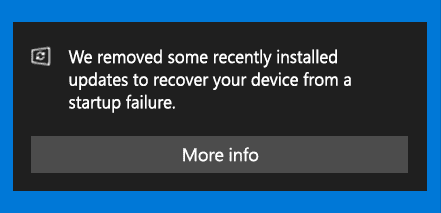
Well, we may have some reprieve from these buggy patches. Microsoft has announced that it will start uninstalling problematic patches automatically from Windows 10 systems when it detects a startup issue due to incompatibility or issues stemming from a recently installed patch. The following notification will be presented:
“We removed some recently installed updates to recover your device from a startup failure.”

According to this KB4492307 posted by Microsoft, the problematic patch will not be reinstalled for 30 days to allow Microsoft and it’s partners to investigate and fix the issues. This process seems like a good proactive approach by Microsoft to get a handle of buggy patches, however more information is needed in terms of how this will work with detection, deployments, and compliance of these patches using ConfigMgr and WSUS as mechanisms for patch management in the enterprise. Time will tell, we hope!

KB3035131 March 2015 – LogonUI.exe Error

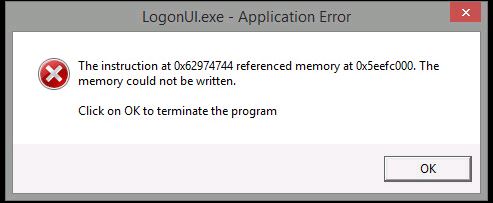
We have discovered an issue with one of the patches from March 2015, KB3035131 against our Windows 8.1 systems in VMware VDI. Upon installation of this patch, Windows 8.1 systems are unusable as they are presented with a LogonUI.exe error on startup as seen below. In order to get the systems in working condition, the only resolution at this point is to revert to a previous snapshot and disable the 3035131 patch from installing on these Windows 8.1 systems.

memory_error_2015-03-13

There’s not much info on the Internet regarding this particular issue, or at least one that I can find, however there are some mentions of the use of StartIsBack or Classic Shell, but we are not using them. It will be interesting to know if others have encountered a similar experience, what are the known causes, and if there’s a fix to rectify this issue.